Posts für Suchanfrage checkit_tiff werden nach Relevanz sortiert angezeigt. Nach Datum sortieren Alle Posts anzeigen

Montag, 16. April 2018

Wie verwirrend! How confusing! Defaults in TIFF

Hint: english version below :)

Erste Überlegung: Hä?

Ernsthaft? Was soll denn an den Defaults von TIFF so problematisch sein? Steht doch alles in der Spezifikation. Es gilt:
  1. Enthält ein TIFF ein Tag nicht, für das ein Default definiert ist, gilt der Default.
  2. Wenn ein TIFF ein Tag enthält, gilt der Wert des Tags.
  3. Sonst gilt, der Wert ist nicht definiert und demnach nicht vorhanden.

Der zweite Blick

Leider ist es in der Praxis komplizierter. Ich bekam die Frage, wenn jhove bei der Prüfung der von checkit_tiff mitgelieferten Beispiel-TIFFs für das Thresholding-Tag 263 den Wert "1" ausgibt:
$> jhove tiffs_should_pass/minimal_valid_baseline.tiff
Jhove (Rel. 1.6, 2011-01-04)
 Date: 2018-04-16 12:41:25 MESZ
 RepresentationInformation: tiffs_should_pass/minimal_valid_baseline.tiff
  ReportingModule: TIFF-hul, Rel. 1.5 (2007-10-02)
  LastModified: 2017-07-14 11:28:57 MESZ
  Size: 323
  Format: TIFF
  Version: 5.0
  Status: Well-Formed and valid
  SignatureMatches:
   TIFF-hul
  MIMEtype: image/tiff
  Profile: Baseline bilevel (Class B), TIFF/IT-BP (ISO 12639:1998), TIFF/IT-BP/P1 (ISO 12639:1998), TIFF/IT-BP/P2 (ISO 12639:1998), TIFF/IT-MP (ISO 12639:1998)
  TIFFMetadata:
   ByteOrder: little-endian
   IFDs:
    Number: 1
    IFD:
     Offset: 38
     Type: TIFF
     Entries:
      NisoImageMetadata:
       ByteOrder: little_endian
       CompressionScheme: uncompressed
       ImageWidth: 20
       ImageHeight: 10
       ColorSpace: white is zero
       Orientation: normal
       SamplingFrequencyUnit: inch
       XSamplingFrequency: 376,193
       YSamplingFrequency: 376,193
       BitsPerSample: 1
       BitsPerSampleUnit: integer
       SamplesPerPixel: 1
      NewSubfileType: 0
      SampleFormat: 1
      MinSampleValue: 0
      MaxSampleValue: 1
      Threshholding: 1
      TIFFITProperties:
       BackgroundColorIndicator: background not defined
       ImageColorIndicator: image not defined
       TransparencyIndicator: no transparency
       PixelIntensityRange: 0, 1
       RasterPadding: 1 byte
       BitsPerRunLength: 8
       BitsPerExtendedRunLength: 16
aber checkit_tiff mit dem beigefügten Beispiel keinen Fehler wirft, obwohl doch keine Positiv-Regel in der Konfigurationsdatei hinterlegt ist:
$> checkit_tiff example_configs/cit_tiff6_baseline_SLUB.cfg tiffs_should_pass/minimal_valid_baseline.tiff
'./build/checkit_tiff' version: development_v0.4.0
    revision: 408
licensed under conditions of libtiff (see http://libtiff.maptools.org/misc.html)
cfg_file=example_configs/cit_tiff6_baseline_SLUB.cfg
tiff file/dir=tiffs_should_pass/minimal_valid_baseline.tiff
file: tiffs_should_pass/minimal_valid_baseline.tiff
(./)    general    --> TIFF should have just one IFD, (lineno: 12)
(./)    general    --> All tag offsets should be word aligned, (lineno: 14)
(./)    general    --> All offsets may only be used once, (lineno: 14)
(./)    general    --> All tag offsets should be greater than zero, (lineno: 14)
(./)    general    --> All IFDs should be word aligned, (lineno: 15)
(./)    general    --> Tags should be sorted in ascending order, (lineno: 15)
(./)    tag 256 (ImageWidth)    --> Tag should have a value in a range of (lineno: 23)
(./)    tag 257 (ImageLength)    --> Tag should have a value in a range of (lineno: 25)
(./)    tag 258 (BitsPerSample)    --> One or more conditions needs to be combined in a logical_or operation (open) (lineno: 30)
(./)    tag 259 (Compression)    --> Tag should have one exact value. (lineno: 36)
(./)    tag 262 (Photometric)    --> Tag should have a value in a range of (lineno: 40)
(./)    tag 273 (StripOffsets)    --> TIFF should contain this tag. (lineno: 45)
(./)    tag 277 (SamplesPerPixel)    --> Tag should have one exact value. (lineno: 52)
(./)    tag 278 (RowsPerStrip)    --> Tag should have a value in a range of (lineno: 55)
(./)    tag 279 (StripByteCounts)    --> TIFF should contain this tag. (lineno: 60)
(./)    tag 282 (XResolution)    --> Tag should have a value in a range of (lineno: 63)
(./)    tag 283 (YResolution)    --> Tag should have a value in a range of (lineno: 66)
(./)    tag 296 (ResolutionUnit)    --> Tag should have one exact value. (lineno: 69)
(./)    tag 254 (SubFileType)    --> One or more conditions needs to be combined in a logical_or operation (open) (lineno: 77)
(./)    tag 274 (Orientation)    --> Tag should have one exact value. (lineno: 113)
(./)    tag 284 (PlanarConfig)    --> Tag should have one exact value. (lineno: 122)
(./)
(./)Yes, the given tif is valid :)
Zuerst war ich etwas erschrocken, war ich mir doch sicher, dass checkit_tiff funktioniert und ich alles sorgfältig geprüft hatte. Zur Sicherheit habe ich die Ausgabe mit tiffdump der libtiff geprüft:
$> tiffdump tiffs_should_pass/minimal_valid_baseline.tifftiffs_should_pass/minimal_valid_baseline.tiff:
Magic: 0x4949 <little-endian> Version: 0x2a <ClassicTIFF>
Directory 0: offset 38 (0x26) next 0 (0)
SubFileType (254) LONG (4) 1<0>
ImageWidth (256) SHORT (3) 1<20>
ImageLength (257) SHORT (3) 1<10>
BitsPerSample (258) SHORT (3) 1<1>
Compression (259) SHORT (3) 1<1>
Photometric (262) SHORT (3) 1<0>
StripOffsets (273) LONG (4) 1<8>
Orientation (274) SHORT (3) 1<1>
SamplesPerPixel (277) SHORT (3) 1<1>
RowsPerStrip (278) SHORT (3) 1<64>
StripByteCounts (279) LONG (4) 1<30>
XResolution (282) RATIONAL (5) 1<376.193>
YResolution (283) RATIONAL (5) 1<376.193>
PlanarConfig (284) SHORT (3) 1<1>
ResolutionUnit (296) SHORT (3) 1<2>
Gut, tiffdump war auf meiner Seite. Was ist also der Grund für diese Diskrepanz? Schauen wir zuerst in die TIFF-6.0 Spezifikation, dort steht auf Seite 41:
For black and white TIFF files that represent shades of gray, the technique used to
convert from gray to black and white pixels.
Tag = 263 (107.H)
Type = SHORT
N = 1
1 = No dithering or halftoning has been applied to the image data.
2 = An ordered dither or halftone technique has been applied to the image data.
3 = A randomized process such as error diffusion has been applied to the image data.
Default is Threshholding = 1. See also CellWidth, CellLength.
Okay. Für das oben benutzte TIFF trifft zu, dass es schwarz-weiß ist und kein Tag 263 enthält. Daher wird der Default = 1 angenommen.

Jhove präsentiert die Metadaten der TIFF-Dateien also so, wie ein TIFF-Reader sie interpretieren würde. Die Tools checkit_tiff und tiffdump zeigen dagegen, welche TIFF-Tags mit welchen Werten tatsächlich in den TIFF-Dateien explizit kodiert sind.

Fazit

Kenne Deine Tools! Statt Default-Werte zu interpretieren, sollten solche Annahmen explizit gekennzeichnet werden. Für den Durchschnittsanwender ist sonst nicht ersichtlich, wie die Ergebnisse zustande kommen. Als Lektion für checkit_tiff nehme ich diese Frage mit in die FAQ auf.


First thought: WTF?

Seriously? What's supposed to be so problematic about TIFF's defaults? After all, the Spezifikation says it all. The rules are:
  1. If a TIFF does not contain a tag that has a well-defined default value, then that default value is used.
  2. If a TIFF does contain a tag, then that tag's value is used.
  3. In all other cases, the value is undefined and hence nonexistent.

Der zweite Blick

Unfortunately, the real world is a little more complicated. I was asked why jhove would give a value of "1" for the Thresholding tag 263 when validating TIFF-examples that are delivered with checkit_tiff as shown below:
$> jhove tiffs_should_pass/minimal_valid_baseline.tiff
Jhove (Rel. 1.6, 2011-01-04)
 Date: 2018-04-16 12:41:25 MESZ
 RepresentationInformation: tiffs_should_pass/minimal_valid_baseline.tiff
  ReportingModule: TIFF-hul, Rel. 1.5 (2007-10-02)
  LastModified: 2017-07-14 11:28:57 MESZ
  Size: 323
  Format: TIFF
  Version: 5.0
  Status: Well-Formed and valid
  SignatureMatches:
   TIFF-hul
  MIMEtype: image/tiff
  Profile: Baseline bilevel (Class B), TIFF/IT-BP (ISO 12639:1998), TIFF/IT-BP/P1 (ISO 12639:1998), TIFF/IT-BP/P2 (ISO 12639:1998), TIFF/IT-MP (ISO 12639:1998)
  TIFFMetadata:
   ByteOrder: little-endian
   IFDs:
    Number: 1
    IFD:
     Offset: 38
     Type: TIFF
     Entries:
      NisoImageMetadata:
       ByteOrder: little_endian
       CompressionScheme: uncompressed
       ImageWidth: 20
       ImageHeight: 10
       ColorSpace: white is zero
       Orientation: normal
       SamplingFrequencyUnit: inch
       XSamplingFrequency: 376,193
       YSamplingFrequency: 376,193
       BitsPerSample: 1
       BitsPerSampleUnit: integer
       SamplesPerPixel: 1
      NewSubfileType: 0
      SampleFormat: 1
      MinSampleValue: 0
      MaxSampleValue: 1
      Threshholding: 1
      TIFFITProperties:
       BackgroundColorIndicator: background not defined
       ImageColorIndicator: image not defined
       TransparencyIndicator: no transparency
       PixelIntensityRange: 0, 1
       RasterPadding: 1 byte
       BitsPerRunLength: 8
       BitsPerExtendedRunLength: 16
However, checkit_tiff does not throw an error while validating the same sample file, even though there's no whitelist rule for that tag in the config file:
$> checkit_tiff example_configs/cit_tiff6_baseline_SLUB.cfg tiffs_should_pass/minimal_valid_baseline.tiff
'./build/checkit_tiff' version: development_v0.4.0
    revision: 408
licensed under conditions of libtiff (see http://libtiff.maptools.org/misc.html)
cfg_file=example_configs/cit_tiff6_baseline_SLUB.cfg
tiff file/dir=tiffs_should_pass/minimal_valid_baseline.tiff
file: tiffs_should_pass/minimal_valid_baseline.tiff
(./)    general    --> TIFF should have just one IFD, (lineno: 12)
(./)    general    --> All tag offsets should be word aligned, (lineno: 14)
(./)    general    --> All offsets may only be used once, (lineno: 14)
(./)    general    --> All tag offsets should be greater than zero, (lineno: 14)
(./)    general    --> All IFDs should be word aligned, (lineno: 15)
(./)    general    --> Tags should be sorted in ascending order, (lineno: 15)
(./)    tag 256 (ImageWidth)    --> Tag should have a value in a range of (lineno: 23)
(./)    tag 257 (ImageLength)    --> Tag should have a value in a range of (lineno: 25)
(./)    tag 258 (BitsPerSample)    --> One or more conditions needs to be combined in a logical_or operation (open) (lineno: 30)
(./)    tag 259 (Compression)    --> Tag should have one exact value. (lineno: 36)
(./)    tag 262 (Photometric)    --> Tag should have a value in a range of (lineno: 40)
(./)    tag 273 (StripOffsets)    --> TIFF should contain this tag. (lineno: 45)
(./)    tag 277 (SamplesPerPixel)    --> Tag should have one exact value. (lineno: 52)
(./)    tag 278 (RowsPerStrip)    --> Tag should have a value in a range of (lineno: 55)
(./)    tag 279 (StripByteCounts)    --> TIFF should contain this tag. (lineno: 60)
(./)    tag 282 (XResolution)    --> Tag should have a value in a range of (lineno: 63)
(./)    tag 283 (YResolution)    --> Tag should have a value in a range of (lineno: 66)
(./)    tag 296 (ResolutionUnit)    --> Tag should have one exact value. (lineno: 69)
(./)    tag 254 (SubFileType)    --> One or more conditions needs to be combined in a logical_or operation (open) (lineno: 77)
(./)    tag 274 (Orientation)    --> Tag should have one exact value. (lineno: 113)
(./)    tag 284 (PlanarConfig)    --> Tag should have one exact value. (lineno: 122)
(./)
(./)Yes, the given tif is valid :)
Being sure that checkit_tiff works as expected and that I had checked everything, I was shocked at first. To err on the side of safety, I ran a crosscheck of checkit_tiff's output with the output of the tiffdump tool from the libtiff:
$> tiffdump tiffs_should_pass/minimal_valid_baseline.tifftiffs_should_pass/minimal_valid_baseline.tiff:
Magic: 0x4949 <little-endian> Version: 0x2a <ClassicTIFF>
Directory 0: offset 38 (0x26) next 0 (0)
SubFileType (254) LONG (4) 1<0>
ImageWidth (256) SHORT (3) 1<20>
ImageLength (257) SHORT (3) 1<10>
BitsPerSample (258) SHORT (3) 1<1>
Compression (259) SHORT (3) 1<1>
Photometric (262) SHORT (3) 1<0>
StripOffsets (273) LONG (4) 1<8>
Orientation (274) SHORT (3) 1<1>
SamplesPerPixel (277) SHORT (3) 1<1>
RowsPerStrip (278) SHORT (3) 1<64>
StripByteCounts (279) LONG (4) 1<30>
XResolution (282) RATIONAL (5) 1<376.193>
YResolution (283) RATIONAL (5) 1<376.193>
PlanarConfig (284) SHORT (3) 1<1>
ResolutionUnit (296) SHORT (3) 1<2>
Well, tiffdump was in my team there. So, what's the reason for that discrepancy? First, let's have a loot at the TIFF-6.0 Spezifikation. On page 41, the specification states:
For black and white TIFF files that represent shades of gray, the technique used to
convert from gray to black and white pixels.
Tag = 263 (107.H)
Type = SHORT
N = 1
1 = No dithering or halftoning has been applied to the image data.
2 = An ordered dither or halftone technique has been applied to the image data.
3 = A randomized process such as error diffusion has been applied to the image data.
Default is Threshholding = 1. See also CellWidth, CellLength.
Okay. Looking at the sample TIFF we used above, it's true that it's a black-and-white image and does not contain tag 263. Hence, a default = 1 is assumed.

Apparently, Jhove will present the metadata in the TIF files in a way that a TIF reader would interpret them. The tools checkit_tiff and tiffdump however show which TIF tags are actually explicitely encoded in the TIFFs and what values they have.

Wrap-up

Know your tools!Instead of interpreting default values, these kinds of exceptions need to be cleary marked. Otherwise, the genesis of these results might not be apparent to the average user.
I have learned learned my lesson and will include this question into the checkit_tiff FAQ.

Dienstag, 7. Juni 2016

Validating TIFFs with embedded color profiles

About ICC profile validation


In the last days we enhanced our baseline TIFF conformance checking tool "checkit_tiff" with support to validate TIFFs containing embedded ICC profiles.

There are two specifications of ICC profiles. The first and older one is from the year 2001 and available at http://www.color.org/ICC_Minor_Revision_for_Web.pdf. The second one (and current version) is  http://www.color.org/specification/ICC1v43_2010-12.pdf.

The ICC profile standards are very complex and do not really fit in the design of the checkit_tiff configuration files, so we decided to check only the headers of the embedded ICC profiles for now.

Because the differences between the headers of both standards are very marginal at first sight, this could be simple enough to additionally implement it in checkit_tiff.

For more detailed checks we would need a plugin system to delegate validation of embedded standards (as ICC, XMP and so on) to more highly specialized validators.

Ooops, our tool finds more broken TIFFs again


To test the validation, we ran checkit_tiff against some old tiffs from our digitization collection. As you can see in the following picture, the checkit_tiff tool detects a discrepancy between the size of the embedded ICC-profile as reported in TIFF-tag (34675) and the size reported by the ICC profile itself:


After some analysis we made an interesting observation. The given TIFF reports a size of 13691 bytes (in hex: 0x357b), but the ICC itself (tag "profile size") reports a size of 669051 bytes (in hex: 0xa357b). We thought we had a bug in our TIFF tag or ICC header decoding, but other tools (exiftool or tiffdump) also reported this difference.

As we saw in previous TIFFs, some TIFF implementations are wrong and often some information were missing because of off-by-one errors. In this case, it seems that the software "Omniscan 12.8 Build2476" does not correctly fill the Tiff-tag 34675 for ICC-profile, leaving out the most significant byte (here: '0xa').

We need your help


Anyway. Writing a conformance checker is a tough job and sometimes we introduce bugs in this kind of software as well. Therefore, please have a look at the code of checkit_tiff, test it and send us bug reports if you find any bugs.
The code can be found on https://github.com/SLUB-digitalpreservation/checkit_tiff.

Here are some open questions about ICC profiles that we have encountered:


  • We found some TIFFs which reported ICC version 4.2.0, but on http://www.color.org we only found versions 4.3.0 and 2.4.0. Could you help us to find out the differences in the headers for the different versions?


  • The meaning of the field "preferred CMM type" is unclear. We assume that the list of allowed strings is part of the document http://www.color.org/registry/signature/TagRegistry-2016-05.pdf. But we have also found a TIFF where the string 'Lino' is set for this ICC header field. Are we interpreting the document in a wrong way, or has the tag been set to an incorrect value?


Freitag, 20. Januar 2017

repairing TIFF images - a preliminary report

During two years of operation, more than 3.000 ingests have been piling up in the Technical Analyst's workbench of our digital preservation software. The vast majority of them have been singled out by the format validation routines, indicating that there has been a problem with the standard compliance of these files. One can easily see that repairing these files is a lot of work that, because the repository software doesn't support batch operations for TIFF repairs, would require months of repetative tasks. Being IT personnel, we did the only sane thing that we could think of: let the computer take care of that. We extracted the files from our repository's working directory, copied them to a safe storage area and ran an automated repair routine on those files. In this article, we want to go a little into detail about how much of an effort repairing a large corpus of inhomogenously invalid TIFFs actually is, which errors we encountered and which tools we used to repair these errors.

So, let's first see how big our problem actually is. The Technical Analyst's workbench contains 3.101 submission information packages (SIPs), each of them containing exactly one Intellectual Entity (IE). These SIPs contain 107.218 TIFF files, adding up to a grand total of about 1,95 TB of storage. That's an average of 19,08 MB per TIFF image.

While the repository software does give an error message for invalid files that can be found in the WebUI, they cannot be extracted automatically, making them useless for our endeavour. Moreover, our preservation repo uses JHove's TIFF-hul module for TIFF validation, which cannot be modified to accomodate local validation policies. We use a policy that is largely based on Baseline TIFF, including a few extensions. To validate TIFFs against this policy (or any other policy that you can think of, for that matter), my colleague Andreas has created the tool checkit_tiff, which is freely (free as in free speech AND free beer) available on GitHub for anyone to use. We used this tool to validate our TIFF files and single out those that didn't comply with our policy. (If you are interested, we used the policy as configured in the config file cit_tiff6_baseline_SLUB.cfg, which covers the conditions covered in the german document http://www.slub-dresden.de/ueber-uns/slubarchiv/technische-standards-fuer-die-ablieferung-von-digitalen-dokumenten/langzeitarchivfaehige-dateiformate/handreichung-tiff/ as published on 2016-06-08.)

For the correction operations, we used the tool fixit_fiff (also created by Andreas and freely available), the tools tiffset and tiffcp from the libtiff suite and convert from ImageMagick. All of the operations ran on a virtual machine with 2x 2,2GHz CPUs and 3 GB RAM with a recent and fairly minimal Debian 8 installation. The storage was mounted via NFS 3 from a NetApp enterprise NAS system and connected via 10GBit Ethernet. Nevertheless, we only got around 35MB/s throughput during copy operations (and, presumeably, also during repair operations), which we'll have to further investigate in the future.

The high-level algorithm for the complete repair task was as follows:
  1. copy all of the master data from the digital repository to a safe storage for backup
  2. duplicate that backup data to a working directory to run the actual validation/repair in
  3. split the whole corpus into smaller chunks of 500 SIPs to keep processing times low and be able to react if something goes wrong
  4. run repair script, looping through all TIFFs in the chunk
    1. validate a tiff using checkit_tiff
    2. if TIFF is valid, go to next TIFF (step 4), else continue (try to repair TIFF)
    3. parse validation output to find necessary repair steps
    4. run necessary repair operations
    5. validate the corrected tiff using checkit_tiff to detect errors that haven't been corrected
    6. recalculate the checksums for the corrected files and replace the old checksums in the metadata with the new ones
  5. write report to log file
  6. parse through report log to identify unsolved problems, create repair recipies for those and/or enhance fixit_tiff
  7. restore unrepaired TIFFs from backup, rerun repair script
  8. steps 4-7 are run until only those files are left that cannot be repaired in an automatic workflow
During the several iterations of validation, failed correction and enhancements for the repair recipies, we found the following correctable errors. Brace yourself, it's a long list. Feel free to scroll past it for more condensed information.
  • "baseline TIFF should have only one IFD, but IFD0 at 0x00000008 has pointer to IFDn 0x<HEX_ADDRESS>"
    • This is a multipage TIFF with a second Image File Directory (IFD). Baseline TIFF requires only the first IFD to be interpreted by byseline TIFF readers.
  • "Invalid TIFF directory; tags are not sorted in ascending order"
    • This is a violation of the TIFF6 specification, which requires that TIFF tags in an IFD must be sorted ascending by their respective tag number.
  • "tag 256 (ImageWidth) should have value , but has value (values or count) was not found, but requested because defined"
    • The tag is required by the baseline TIFF specification, but wasn't fount in the file.
  • "tag 257 (ImageLength) should have value , but has value (values or count) was not found, but requested because defined"
    • Same here.
  • "tag 259 (Compression) should have value 1, but has value X"
    • This is a violation of our internal policy, which requires that TIFFs must be stored without any compression in place. Values for X that were found are 4, 5 and 7, which are CCITT T.6 bi-level encoding, LZW compression and TIFF/EP JPEG baseline DCT-based lossy compression, respectively. The latter one would be a violation of the TIFF6 specification. However, we've noticed that a few files in our corpus were actually TIFF/EPs, where Compression=7 is a valid value.
  • "tag 262 (Photometric) should have value <0-2>, but has value (values or count) 3"
    • The pixels in this TIFF are color map encoded. While this is valid TIFF 6, we don't allow it in the context of digital preservation.
  • "tag 262 (Photometric) should have value , but has value (values or count) was not found, but requested because defined"
    • The tag isn't present at all, even though it's required by the TIFF6 specification.
  • "tag 269 (DocumentName) should have value ^[[:print:]]*$, but has value (values or count) XXXXX"
    • The field is of ASCII type, but contains characters that are not from the 7-Bit ASCII range. Often, these are special characters that are specific to a country/region, like the German "ä, ö, ü, ß".
  • "tag 270 (ImageDescription) should have value word-aligned, but has value (values or count) pointing to 0x00000131 and is not word-aligned"
    • The TIFF6 specification requires IFD tag fields to always start at word boundaries, but this field does not, thus violating the specification.
  • "tag 271 (Make) should have value ^[[:print:]]*$, but has value (values or count)"
    • The Make tag is empty, even though the specification requires it contains a string of the manufacturer's name.
  • "tag 271 (Make) should have value ^[[:print:]]*$, but has value (values or count) Mekel"
    • That's a special case where scanners from the manufacturer Mekel write multiple NULL-Bytes ("\0") at the end of the Make tag, presumeably for padding. This, however, violates the TIFF6 specification.
  • "tag 272 (Model) should have value ^[[:print:]]*$, but has value (values or count)"
    • The Model tag is empty, even though the specification requires it contains a string of the scanner device's name.
  • "tag 273 (StripOffsets) should have value , but has value (values or count) was not found, but requested because defined"
    • The tag isn't present at all, even though it's required by the TIFF6 specification.
  • "tag 278 (RowsPerStrip) should have value , but has value (values or count) was not found, but requested because defined"
    • Same here.
  • "tag 278 (RowsPerStrip) should have value , but has value (values or count) with incorrect type: unknown type (-1)"
    • This error results from the previous one: if a field doesn't exist, then checkit_tiff will assume data type "-1", knowing that this is no valid type in the real world.
  • "tag 278 (RowsPerStrip) was not found, but requested because defined"
    • The tag isn't present at all, even though it's required by the TIFF6 specification.
  • "tag 279 (StripByteCounts) should have value , but has value (values or count) was not found, but requested because defined"
    • The field doesn't contain a value, which violates the TIFF6 specification.
  • "tag 282 (XResolution) should have value word-aligned, but has value (values or count) pointing to 0x00000129 and is not word-aligned"
    • The TIFF6 specification requires IFD tag fields to always start at word boundaries, but this field does not, thus violating the specification.
  • "tag 292 (Group3Options) is found, but is not whitelisted"
    • As compression is not allowed in our repository, we disallow this field that comes with certain compression types as well.
  • "tag 293 (Group4Options) is found, but is not whitelisted"
    • Same here.
  • "tag 296 (ResolutionUnit) should have value , but has value"
    • The tag ResolutionUnit is a required field and is set to "2" (inch) by default. However, if the field is completely missing (as was the case here), this is a violation of the TIFF6 specification.
  • "tag 296 (ResolutionUnit) should have value , but has value (values or count) with incorrect type: unknown type (-1)"
    • This error results from the previous one: if a field doesn't exist, then checkit_tiff will assume data type "-1", knowing that this is no valid type in the real world.
  • "tag 297 (PageNumber) should have value at [1]=1, but has value (values or count) at [1]=0"
    • The TIFF6 specification states that: "If PageNumber[1] is 0, the total number of pages in the document is not available.". We don't allow this in our repository by local policy.
  • "tag 306 (DateTime) should have value ^[12][901][0-9][0-9]:[01][0-9]:[0-3][0-9] [012][0-9]:[0-5][0-9]:[0-6][0-9]$, but has value (values or count) XXXXX"
    • That's one of the most common errors. It's utterly unbelievable how many software manufacturers don't manage to comply with the very clear rules of how the DateTime string in a TIFF needs to be formatted. This is a violation of the TIFF6 specification.
  • "tag 306 (DateTime) should have value should be  "yyyy:MM:DD hh:mm:ss", but has value (values or count) of datetime was XXXXX"
    • Same here
  • "tag 306 (DateTime) should have value word-aligned, but has value (values or count) pointing to 0x00000167 and is not word-aligned"
    • The TIFF6 specification requires IFD tag fields to always start at word boundaries, but this field does not, thus violating the specification.
  • "tag 315 (Artist) is found, but is not whitelisted"
    • The tag Artist may contain personal data and is forbidden by local policy.
  • "tag 317 (Predictor) is found, but is not whitelisted"
    • The tag Predcitor is needed for encoding schemes that are not part of the Baseline TIFF6 specification, so we forbid it by local policy.
  • "tag 320 (Colormap) is found, but is not whitelisted"
    • TIFFs with this error message contain a color map instead of being encoded as bilevel/greyscale/RGB images. This is something that is forbidden by policy, hence we need to correct it.
  • "tag 339 (SampleFormat) is found, but is not whitelisted"
    • This tag is forbidden by local policy.
  • "tag 33432 (Copyright) should have value ^[[:print:]]*$, but has value (values or count)"
    • The Copyright tag is only allowed to have character values from the 7-Bit ASCII range. TIFFs that violate this rule from the TIFF6 specification will throw this error.
  • "tag 33434 (EXIF ExposureTime) is found, but is not whitelisted"
    • EXIF tags may never be referenced out of IFD0, but always out of their own ExifIFD. As this probably hasn't happened here, this needs to be seen as a violation of the TIFF6 specification.
  • "tag 33437 (EXIF FNumber) is found, but is not whitelisted"
    • Same here.
  • "tag 33723 (RichTIFFIPTC / NAA) is found, but is not whitelisted"
    • This tag is not allowed by local policy.
  • "tag 34665 (EXIFIFDOffset) should have value , but has value"
    • In all cases that we encountered, the tag EXIFIFDOffset was set to the wrong type. Instead of being of type 4, it was of type 13, which violates the TIFF specification.
  • "tag 34377 (Photoshop Image Ressources) is found, but is not whitelisted"
    • This proprietary tag is not allowed by local policy.
  • "tag 34675 (ICC Profile) should have value pointing to valid ICC profile, but has value (values or count) preferred cmmtype ('APPL') should be empty or (possibly, because ICC validation is alpha code) one of following strings: 'ADBE' 'ACMS' 'appl' 'CCMS' 'UCCM' 'UCMS' 'EFI ' 'FF  ' 'EXAC' 'HCMM' 'argl' 'LgoS' 'HDM ' 'lcms' 'KCMS' 'MCML' 'WCS ' 'SIGN' 'RGMS' 'SICC' 'TCMM' '32BT' 'WTG ' 'zc00'"
    • This is a juicy one. This error message indicates that something's wrong with the embedded ICC profile. In fact, the TIFF itself might be completely intact, but the ICC profile has the value of the cmmtype field set to a value that is not part of the controlled vocabulary for this field, so the ICC standard is violated.
  • "tag 34852 (EXIF SpectralSensitivity) is found, but is not whitelisted"
    • EXIF tags may never be referenced out of IFD0, but always out of their own ExifIFD. 
  • "tag 34858 (TimeZoneOffset (TIFF/EP)) is found, but is not whitelisted"
    • TIFF/EP tags are not allowed in plain TIFF6 images.
  • "tag 36867 (EXIF DateTimeOriginal) is found, but is not whitelisted"
    • EXIF tags may never be referenced out of IFD0, but always out of their own ExifIFD.
  • "tag 37395 (ImageHistory (TIFF/EP)) is found, but is not whitelisted"
    • Same here.
Some of the errors, however, could not be corrected by means of an automatic workflow. These images will have to be rescanned from their respective originals:
  • "tag 282 (XResolution) should have value <300-4000>, but has value (values or count) 200, 240, 273, 72"
    • This tag contains a value for the image's horizontal resolution that is too low for what is needed to comply with the policy. In this special case, that policy is not our own, but the one stated in the German Research Foundation's (Deutsche Forschungsgemeinschaft, DFG) "Practical Guidelines for Digitisation" (DFG-Praxisregeln "Digitalisierung", document in German, http://www.dfg.de/formulare/12_151/12_151_de.pdf), where a minimum of 300 dpi is required for digital documents that were scanned from an analog master and are intended for close examination. 1.717 files contained this error.
  • "tag 283 (YResolution) should have value <300-4000>, but has value (values or count) 200, 240, 273, 72"
    • Same here, but for the vertical resolution.
  • "tag 297 (PageNumber) should have value at [1]=1, but has value (values or count) at [1]=2"
    • This error message indicates that the TIFF has more than one pages (in this case two master images), which is forbidden by our internal policy. Five images contained this error.
  • "tag 297 (PageNumber) should have value at [1]=1, but has value (values or count) at [1]=3"
    • Same here. One image contained this error.
  • "tag 297 (PageNumber) should have value at [1]=1, but has value (values or count) at [1]=5"
    • Same here. One image contained this error.
  • "TIFF Header read error3: Success"
    • This TIFF was actually broken, had a file size of only 8 Bytes and was already defective when it was ingested into the repository. One image contained this error.
From our experiences, Andreas has created eight new commits for fixit_tiff (commits f51f71d to cf9b824) that made fixit_tiff more capable and more independent of the libtiff, which contained quite some bugs and sometimes even created problems in corrected TIFFs that didn't exist before. He also improved checkit_tiff to vastly increase performance (3-4 orders of magnitude) and helped build correction recipies.

The results are quite stunning and saved us a lot of work:
  • Only 1.725 out of 107.218 TIFF files have not been corrected and will have to be rescanned. That's about 1,6% of all files. All other files were either correct from the beginning or have successfully been corrected.
  • 26 out of 3.103 SIPs still have incorrect master images in them, which is a ratio of 0,8%.
  • 11 new correction recipies have been created to fix a total of 41 errors (as listed above).
  • The validation of a subset of 6.987 files just took us 37m:46s (= 2.266 seconds) on the latest checkit_tiff version, which is a rate of about 3,1 files/sec. For this speed, checking all 107.218 files would theoretically take approximately 9,7 hours. However, this version hasn't been available during all of the correction, so the speed has been drastically lower in the beginning. We think that 24 - 36 hours would be a more accurate estimate.
  • UPDATE: After further improvements in checkit_tiff (commit 22ced80), checking 87.873 TIFFs took only 51m 53s, which is 28,2 TIFFs per second (yes, that's 28,2 Hz!), marking an ninefold improvement over the previous version for this commit alone. With this new version, we can validate TIFFs with a stable speed, independent from their actual filesize, meaning that we can have TIFF validation practically for free (compared to the effort for things like MD5 calculation).
  • 10.774 out of 107.218 TIFF files were valid from the start, which is pretty exactly 10%.
The piechart shows our top ten errors as extracted from all validation runs. The tag IDs are color coded.


This logarithmically scaled graph shows an assembly of all tags that had any errors, regardless of their nature. The X-axis is labelled with the TIFF tag IDs, and the data itself is labeled with the number of error messages for their respective tag IDs.


Up until now, we've invested 26 person days on this matter (not counting script run times, of course); however, we haven't finished it yet. Some steps are missing until the SIPs can actually be transferred to the permanent storage. First of all, we will revalidate all of the corrected TIFFs to make sure that we haven't made any mistakes while moving corrected data out of the way and replacing it with yet-to-correct data. When this step has completed successfully, we'll reject all of the SIPs from the Technical Analyst's workbench in the repository and re-ingest the SIPs. We hope that there won't be any errors now, but we assume that some will come up and brace for the worst. Also, we'll invest some time to generate some statistics. We hope that this will enable us to make qualified estimates for the costs of reparing TIFF images, for the number of images that are affected by a certain type of errors and for the total quality of our production.

A little hint for those of you that want to try this at home: make sure you run the latest checkit_tiff compliance checker with the "-m" option set to enable memory-mapped operation and get drastically increased performance, especially during batch operation.
For the purpose of analysing TIFF files, checkit_tiff comes with a handy "-c" switch that enables colored output, so you can easily spot any errors on the text output.

I want to use the end of this article to say a few words of warning. On the one hand, we have shown that we are capable of successfully repairing large amounts of invalid or non-compliant files in an automatic fashion. On the other hand, however, this is a dangerous precedence for all the people who don't want to make the effort to increase quality as early as possible during production, because they find it easier to make others fix their sloppy quality. Please, dear digital preservation community, always demand only the highest quality from your producers. It's nothing less than your job, and it's for their best.

Montag, 25. Juli 2016

ICC Farbprofile von TIFFs prüfen


Kaputte ICC Einbettung in TIFFs


Bei einigen TIFFs sind uns Fehler aufgefallen, weil die Größenangaben des ICC Profils nicht mit denen des TIFFs übereinstimmten.

Aus diesem Grunde hatten wir checkit_tiff eine Prüfroutine für die ICC-Header verpasst.

Hier ein Beispiel einer Ausgabe:


$ ./checkit_tiff -c /tmp/00000056.tif ../example_configs/cit_tiff6_baseline_SLUB.cfg
'./checkit_tiff' version: master
    revision: 85
licensed under conditions of libtiff (see http://libtiff.maptools.org/misc.html)
cfg_file=../example_configs/cit_tiff6_baseline_SLUB.cfg
tiff file=/tmp/00000056.tif
check if all IFDs are word aligned
check if only one IFD exists
check if tags are in ascending order
check if all offsets are used once only
check if all offsets are word aligned
check if tag 306 (DateTime) is correct
check if tag 34675 (ICC Profile) is correct
==> tag 34675 (ICC Profile) should have value pointing to valid ICC profile, but has value (values or count) preferred cmmtype ('APPL') should be empty or (possibly, because ICC validation is alpha code) one of following strings: 'ADBE' 'ACMS' 'appl' 'CCMS' 'UCCM' 'UCMS' 'EFI ' 'FF  ' 'EXAC' 'HCMM' 'argl' 'LgoS' 'HDM ' 'lcms' 'KCMS' 'MCML' 'WCS ' 'SIGN' 'RGMS' 'SICC' 'TCMM' '32BT' 'WTG ' 'zc00'
check if tag 256 (ImageWidth) has value in range 1 - 4294967295
check if tag 256 (ImageWidth) has valid type
check if tag 257 (ImageLength) has value in range 1 - 4294967295
check if tag 257 (ImageLength) has valid type
check if tag 258 (BitsPerSample) has these 3-values: 8, 8, 8
check if tag 258 (BitsPerSample) has valid type
check if tag 259 (Compression) has value
check if tag 259 (Compression) has valid type
check if tag 262 (Photometric) has value in range 0 - 2
check if tag 262 (Photometric) has valid type
check if tag 273 (StripOffsets) exists
check if tag 273 (StripOffsets) has valid type
check if tag 277 (SamplesPerPixel) has value
check if tag 277 (SamplesPerPixel) has valid type
check if tag 278 (RowsPerStrip) has value in range 1 - 4294967295
check if tag 278 (RowsPerStrip) has valid type
check if tag 279 (StripByteCounts) has value in range 1 - 4294967295
check if tag 279 (StripByteCounts) has valid type
check if tag 282 (XResolution) has value in range 300 - 1200
check if tag 282 (XResolution) has valid type
check if tag 283 (YResolution) has value in range 300 - 1200
check if tag 283 (YResolution) has valid type
check if tag 296 (ResolutionUnit) has value
check if tag 296 (ResolutionUnit) has valid type
check if tag 254 (SubFileType) has value
check if tag 254 (SubFileType) has valid type
check if tag 266 (FillOrder) has value
check if tag 266 (FillOrder) has valid type
check if tag 271 (Make) has  value matching regex '^[[:print:]]*$'
check if tag 272 (Model) has  value matching regex '^[[:print:]]*$'
check if tag 274 (Orientation) has value
check if tag 274 (Orientation) has valid type
check if tag 284 (PlanarConfig) has value
check if tag 284 (PlanarConfig) has valid type
check if tag 305 (Software) has  value matching regex '^[[:print:]]*$'
check if tag 306 (DateTime) has  value matching regex '^[12][901][0-9][0-9]:[01][0-9]:[0-3][0-9] [012][0-9]:[0-5][0-9]:[0-6][0-9]$'
check if tag 34675 (ICC Profile) exists
check if tag 34675 (ICC Profile) has valid type
check if forbidden tags are still existing
found 1 errors

Extraktion und Weitergehende Analyse  des ICC-Profils


Für eine weitergehende Analyse kann man ff. Vorgehen wählen:
  • Mit dem Werkzeug "exiftool" das ICC-Profil extrahieren:
    exiftool -icc_profile -b -w icc /tmp/kaputt.tiff
  • Mit dem ICC Profiler "profiledump" das extrahierte ICC-Profil "/tmp/kaputt.icc" laden und validieren:
    Windows: wxProfileDump.exe
    Linux: wine wxProfileDump.exe 
Hier die Beispielausgabe:


Montag, 2. Mai 2016

Problemfälle TIFF und Wünsche an TI-A Initiative

Problemfälle TIFF


Auf der Tagung "Archivierung von Unterlagen aus digitalen Systemen" (AUdS), die diesmal an der FH Potsdam stattfand, wurde ich gebeten einen Vortrag zu den bisher in meiner Arbeit gefundenen, problematischen TIFFs zu halten.

Die Folien sind mittlerweile beim Staatsarchiv St. Gallen zu finden (eigentlich sollte an der FH Potsdam auch eine Vortragsaufzeichnung verfügbar sein, konnte ich aber leider noch nicht finden):

http://www.staatsarchiv.sg.ch/home/auds/20/_jcr_content/Par/downloadlist_1/DownloadListPar/download_3.ocFile/ROMEYKE_Folien_AUdS_2016.pdf 

Ich verzichte hier auf eine nochmalige Auflistung aller Problemfälle und verweise auf obige Folien. Dennoch möchte ich auf ein paar Probleme eingehen:

Die meisten Probleme waren auf fehlerhafte Softwareimplementierungen zurückzuführen. Insbesondere das Tag DateTime (306) war eine Quell stetiger Freude.
Laut Spezifikation soll dort ein String der Form YYYY:MM:DD hh:mm:ss\0
stehen. Stattdessen wurde localtime() verwendet, das Datum in dt. Angabe geschrieben oder falsche Trennzeichen benutzt.

Ein anderes Problem mit TIFF sind manchmal vorhandene, sich widersprechende Informationen. Ein Problem bei der Farbkodierung ist in den Folien genannt. Ein anderes besteht in den privaten TIFF-Tags für EXIF-- und ICC-Daten.

Zwar steht in der Spezifikation, daß der Bereich der privaten Tags im Zweifel nicht ausgewertet werden solle, in der  Praxis ist dies aber oft nicht gelöst.So hatte zB. Gimp (aber auch andere Programme, wie Photoshop) ein TIFF stets im tiefsten Schwarz angezeigt. Ursache war ein verkorkstes ICC-Profil, wurde dies gelöscht, wurde der Bildinhalt sichtbar.

Ausblick in Bezug auf die TI-A Initiative


Seit über einem Jahr sind die Macher des im Rahmen von Preforma von der EU geförderten TIFF-Validators "DPFManager" unterwegs und mobilisieren für eine Archiv-TIFF Spezifikation. Unter http://www.ti-a.org kann man sich an der Diskussion beteiligen. Ich hätte mir einen etwas offeneren Beteiligungsprozess gewünscht, das ist aber eine andere Baustelle.

Da im Rahmen der TI-A Initiative mit ein paar Unzulänglichkeiten von TIFF aufgeräumt werden soll, würde ich mir ff. Punkte wünschen, die beibehalten bzw. beachtet werden sollten:

  1. Die Reihenfolge der Tags, als auch die Offsets an gerade Adressen tragen erheblich zur Robustheit von TIFF bei. Diese Eigenschaften sollten nicht, wie von einigen Beitragenden vorgeschlagen, aufgeweicht werden. Im Gegenteil, diese "Einschränkungen" ermöglichen es, durch Bitfehler zerstörte TIFFs leichter zu reparieren.
  2. Es muss ausgeschlossen sein, daß PhotometricInterpretation (262) auf 0 oder 1 gesetzt ist und das Tag Colormap (320) vorhanden ist. Ev. sollte über eine Vorrangsregelung bei Widersprüchen nachgedacht werden.
  3. Ein weiterer Punkt, der vor allem in sogenannten Wang-TIFFs auftrat sollte klar in Spezifikation geklärt sein: Bisher ist es so, daß es zu jedem in einem IFD vorkommenden Tag ua. ein count-Feld gibt, welches die Anzahl der Werte des entsprechenden Typs des Tags bestimmt. Bei Wang-TIFFs existierten Tags, aber das count-Feld wurde auf 0 gesetzt. Ich würde mir wünschen, daß hier die Regelung greift, wenn Tag vorhanden, dann count > 0.

Als Vorschlag für die privaten Tags hätte ich noch, daß bei der Vergabe von privaten Tags ab zwei zusammengehörenden Arten diese nur noch über ein zugehöriges privates IFD-Tag referenziert werden dürfen. Es ist eine Unsitte, daß in TIFFs private Tags zB. DateTimeOriginal (36867) von Exif im IFD0 direkt referenziert werden. Zum einen macht dies die Extraktion und Validierung aufwendiger, zum anderen verkleinert dies den Adressraum der für private Tags genutzt werden kann. Wenn Exif-Daten ausschliesslich über das Exif-IFD (34665) referenziert wird, ist das sauberer.

Als letzten Wunsch erbitte ich mir, daß (mit Zucker drauf), keine Datenkompression erlaubt wird. Andernfalls sollten wir uns lieber mehr Zeit nehmen und dann TI-A so entwickeln, daß es wie FFV1 (Version 3) Mechanismen mitbringt, die Kompression und Robustheit gleichermaßen erlauben (zB. crc32 gesicherte Slices und Header).

Das waren meine 2¢   ;)

PS.: Wer mithelfen mag, den von uns entwickelten freien TIFF Validator "checkit_tiff" zu verbessern, hier der Link: https://github.com/SLUB-digitalpreservation/checkit_tiff

Montag, 26. Februar 2018

Valid TIFFs need love, too.

(english version below)

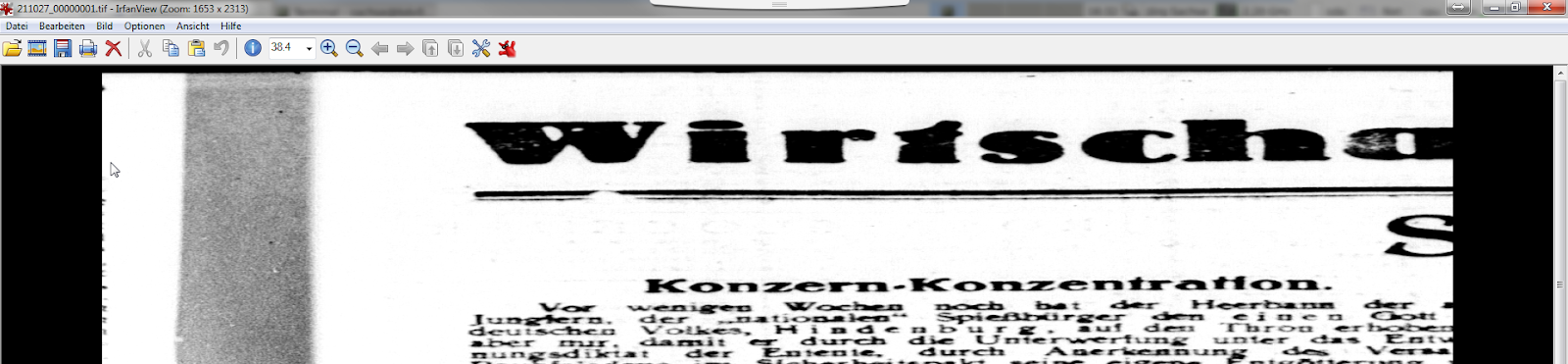
Über einen Kollegen haben wir ein interessantes TIFF erhalten. Es hatte alle Validierungen bestanden und zeigte keine strukturellen Fehler in tiffinfo/tiffdump, ließ sich aber trotzdem im Vorschaubetrachter des Workflowtools nicht anzeigen. Außerdem war es ca. dreimal so groß wie alle anderen Scans aus dem gleichen Vorgang. Er bat uns, das TIFF zu untersuchen.

Im Gegensatz zu ihm habe ich keine Probleme damit gehabt, das TIFF überhaupt zu öffnen; der Windows-Bildbetrachter, IrfanView, MS Paint, Paint.NET und XnViewMP stellten alle das Bild dar. Allerdings war es in der Horizontalen stark gestreckt, d.h. deutlich breiter als erwartet. Große Teile des Bildinhaltes (eine gescannte Zeitschriftenseite) fehlten, und der rechte Rand war nicht sichtbar. 

kaputte Anzeige des TIFFs

In tiffinfo sahen wir, dass das TIFF ein Grayscale-Image ist:
Bits/Sample: 8
Samples/Pixel: 1

Auffällig war, dass die Listeneinträge für StripByteCounts genau um Faktor 3 größer als die ImageWidth waren (4302 * 3 = 12906); das erklärte die Streckung des Bildes in X-Richtung. Man sah außerdem, dass die StripOffsets in Schritten von 12906 Bytes anwuchsen; vermutlich war der Viewer deswegen überhaupt in der Lage, irgendein Bild anzuzeigen. Die ImageLength stimmte mit der Anzahl der Einträge in StripByteCount überein (6020), deshalb gab es hier keine Verzerrung.
Image Width: 4302
Image Length: 6020
StripByteCounts (279) LONG (4) 6020<12906 12906 12906 12906 12906 12906 12906 12906 12906 12906 12906 12906 12906 12906 12906 12906 12906 12906 12906 12906 12906 12906 12906 12906 ...> StripOffsets (273) LONG (4) 6020<8 12914 25820 38726 ...>

In Okteta konnten wir sehen, dass die Bilddaten für jedes Pixel dreimal identisch gespeichert waren. Das deckt sich der Aussage des Kollegen, dass das Bild ca. dreimal größer war als alle anderen Scans im gleichen Vorgang. Außerdem haben wir gesehen, dass das IFD0 am Dateiende stand und Hinweise auf Bearbeitungen mit IrfanView enthielt.

normales RGB-TIFF

defektes TIFF mit zwei Bytes redundanten Grayscale-Daten je Pixel


Nachdem wir das Problem verstanden hatten, haben wir Reparaturmöglichkeiten diskutiert:
- Man könnte die Redundanz der Pixel entfernen und die StripOffsets (und wahrscheinlich noch andere Offsets) anpassen. Das wäre wahrscheinlich die sauberere Lösung, müsste aber definitiv mit Softwareunterstützung getan werden.
- Man könnte die SamplesPerPixel auf "3" setzen, um die drei duplizierten Bytes je Pixel als RGB-Kanäle zu interpretieren und damit drei Bytes zu einem Pixel im Bild zusammenzufassen. Das haben wir getan, und es hat funktioniert; zumindest war das Bild anzeigbar, nicht gestaucht und nicht in ausgefallene Farben getaucht.

Zur Ursache des Fehlers gab es nun zwei Theorien:
- Es könnte einen Bitflip gegeben haben, bei dem SamplesPerPixel beschädigt wurde: der Weg von "00 11"B ("0 3" D) zu "00 01"B ("0 1" D) ist nicht weit und würde das Fehlerbild erklären.
- Es könnte einen Fehler bei der Konvertierung eines RGB-Scans von einer Grayscale-Vorlage gegeben haben, bei dem die überzähligen Bytes pro Pixel nicht entfernt wurden. Das SamplesPerPixel Tag wäre dabei korrekt und absichtlich gesetzt worden.

Als erstes haben wir nun also SamplesPerPixel im Hex-Editor auf "3" gesetzt, um den TIFF-Viewer anzuweisen, die Bilddaten als RGB-Bild zu interpretieren. Schon diese kleine Änderung bewirkte, dass sich das Bild fehlerfrei anzeigen ließ. Der Umstand, dass das Bild ungewöhnlich groß war (wir hatten erwartet, dass es ähnlich groß wäre wie die anderen Scans aus der gleichen Zeitschrift), blieb aber vorerst ungeklärt.

defektes Grayscale-TIFF, als RGB interpretiert


korrekte Anzeige des TIFFs

Wir erwägen, eine Plausibilitätsprüfung für diesen Fehlertyp in checkit_tiff zu implementieren, sofern man davon ausgeht, dass innerhalb eines Bildes alle Strips gleich lang sind. Dazu verwendet man die Formel: "StripByteCounts / SamplesPerPixel / RowsPerStrip = ImageWidth". Am einfachsten funktioniert das mit TIFFs, bei denen RowsPerStrip = 1 ist; andernfalls müssen zusätzlich komplexere Prüfungen durchgeführt werden, weil bei mehrzeiligen Strips, deren Bytelänge nicht ohne Rest ganzzahlig durch die Zeilenanzahl teilbar ist, kein Padding angefügt wird. Dadurch können Rows entstehen, die kürzer sind als die vorderen Rows eines Strips. 

Zusätzlich denkbare Plausibilitätsprüfungen wären:
- Die Höhe des Bildes ist genau so lang wie das Produkt aus RowsPerStrip und Anzahl der Strips: ImageLength = RowsPerStrip * StripOffsets.Count
- Jeder StripByteCount muss so groß sein wie die Differenz der dazugehörigen StripByteOffsets: StripByteCounts[0] = StripOffsets[1] - StripOffsets[0] (bzw. allgemeiner StripByteCounts[n] = StripOffsets[n+1] - StripOffsets[n])
- Jeder Strip muss gleich lang sein: StripByteCounts[0] = StripByteCounts[1] = StripByteCounts[2] = ... = StripByteCounts[n]

Diese Möglichkeiten haben wir im größeren Kreis diskutiert, was Andreas neugierig gemacht hat. Er hat also sein neues Tool zum Finden möglicher ehemaliger IFDs in TIFFs um einige weiche Suchkritierien erweitert und es genutzt, um IFDs aus früheren Dateiversionen zu finden. Außerdem hat er ein ganz neues Tool geschrieben, das eine TIFF-Datei und eine Adresse in Hex-Notation einliest und den Inhalt an dieser Adresse so interpretiert, als wäre dort ein IFD gespeichert. Auf diese Weise konnten wir insgesamt sechs frühere IFDs ermitteln, die auf ältere Versionen der Datei hinweisen, und den Inhalt dieser IFDs in Augenschein nehmen. Die Tools sind unter https://github.com/SLUB-digitalpreservation/fixit_tiff/tree/master/src/archeological_tools im Quellcode verfügbar; sie sind Teil des bekannten Tools fixit_tiff.

Pointer zum ursprünglichen IFD0, wie er in der ersten Version der Datei stand

Die Ausgabe möglicher IFD-Adressen sieht so aus:
# adress,weight,is_sorted,has_required_baseline
0x4a184b0,2,y,y
0x4a241aa,2,y,y
0x4a2fea4,2,y,y
0x4a3bbb0,2,y,y
0x4a478d0,2,y,y
0x4a535ea,2,y,y

Diese Adressen der IFDs haben wir mittels Hex-Editor als IFD0-Offset in die TIFF-Datei eingetragen und so in einer Art TIFF-Archäologie schrittweise die alten Versionen der Datei wieder hergestellt. Dabei bestätigte sich die Annahme, dass der Scan ursprünglich in RGB abgespeichert worden war. Danach wurde wohl eine fehlerhafte Grayscale-Konvertierung durchgeführt, bei der nur die Tags PhotometricInterpretation (min-is-black) und BitsPerSample (1) verändert wurden. Ob dabei auch die Bilddaten selbst verändert wurden, lässt sich nicht mehr genau rekonstruieren.

In der vermutlich ersten Version des IFD0 sieht man mit tiffinfo noch die Angaben zum RGB-Bild:
Photometric Interpretation: RGB color
Samples/Pixel: 3

Die späteren Fassungen dagegen enthalten die Werte:
Photometric Interpretation: min-is-black
Samples/Pixel: 1

Außerdem wurden noch einige weitere Versionen des TIFFs erzeugt, bei denen einige andere Tags verändert, hinzugefügt oder entfernt wurden (Make, Model und Software).

Der Fehler war überhaupt nur aufgefallen, weil es eine intellektuelle Prüfung gab und der Bearbeiterin der Anzeigefehler auffiel (und sie ihn dann auch gemeldet hat!). Weil außerdem die MD5-Summen erst am Ende der Bearbeitung generiert werden und damit zum Fehlerzeitpunkt noch keine Prüfsumme existierte, wäre der Fehler nicht durch einen Fixity-Mismatch aufgefallen. Die einzig saubere Lösung wird nun wohl sein, die Seite neu zu scannen. Trotzdem ist es aber sehr eindrucksvoll zu sehen, welche Möglichkeiten das TIF Format bietet, kaputte Dateien wiederherzustellen.

frühere Artikel zu diesem Thema (also available in English):


-------------------------------------------------------------------------------------------------------------------

english version

A few days ago, a colleague gave us an interesting TIFF. It had successfully completed all validation attempts and didn't show any signs of structural issues in tiffinfo/tiffdump. However, it was not possible to display the image in the preview of the workflow tool used. Also, it was about three times the size of the other scans in the same intellectual entity. Our colleague asked us to have a closer look at that TIFF, so we went at it.

In contrast to our colleague, I didn't have any problem in displaying the TIFF altogether; the  Windows Image Viewer, IrfanView, MS Paint, Paint.NET und XnViewMP all displayed the image correctly. However, it was significantly stretched horizontally, which means that it was a lot wider than expected. Large parts of the scanned newspaper page were missing, and the rightmost part of the image was not visible.

broken display of the TIFF

In tiffinfo, we saw that the TIFF is a grayscale image:
Bits/Sample: 8
Samples/Pixel: 1

Particularly striking was the fact that the list entries for StripByteCounts was exactly by faktor 3 larger than the ImageWidth (4302 * 3 = 12906), which explained the stretch we saw in the image. Also, you could see that the StripOffsets grew in steps of 12906 Bytes; presumeably that's why the viewer was able to display a picture in the first place, regardless of the final quality. The ImageLength matched up with the number of entries in StripByteCount (6020), which is why there was no stretch in vertical direction.
Image Width: 4302
Image Length: 6020
StripByteCounts (279) LONG (4) 6020<12906 12906 12906 12906 12906 12906 12906 12906 12906 12906 12906 12906 12906 12906 12906 12906 12906 12906 12906 12906 12906 12906 12906 12906 ...> StripOffsets (273) LONG (4) 6020<8 12914 25820 38726 ...>

We could see in Okteta that the image data for each pixel were saved identically three times in a row. That explains our colleagues information about the filesize being three times larger than the other files in that IE. Also, we noticed that the IFD0 was written to the end of the file and contained information about an editing step in IrfanView.

normal RGB-TIFF

defective TIFF with two Bytes of redundant grayscale data per pixel

After having understood the problem, we discussed possible ways to repair the file:
- We could remove the redundant pixels and adapt the StripOffsets (and quite possibly all other ofsets in that file). While this is the more proper solution, software support for this kind of work would be imperative.
- We could set SamplesPerPixel to"3" to interpret the three duplicate pixels each as three RGB channels, thus summarizing three Bytes into one pixel. We actually did that, and it worked like a charm; at least we could display the image without getting any stretching or funky colors.

Now we had two theories about the origin of this error:
- There might have been a bit flip that damaged SamplesPerPixel. It's not a long way to go from "00 11"B ("0 3" D) to "00 01"B ("0 1" D), and it would explain the error we're seing.
- There could have been an error during a conversion of an RGB scan that was made from an analog grayscale template, during which the unnecessary pixels have not been removed. During this conversion, the SamplesPerPixel tag would have been rightfully set to a new value.

In a first test we set SamplesPerPixel to "3" using a Hex editor in order to command the TIFF viewer to interpret the image data in an RGB fashion. This little change alone caused the image to be displayed without any errors. The puzzle, however, that the image was uncommonly large (we expected it to about ad big as the other scans from the same newspaper) remained unsolved.


defective grayscale TIFF, interpreted as RGB

TIFF displayed correctly

We contemplated implementing plausibility checks for this type of error in checkit_tiff, which would be easily feasible assuming that all Strips in an image are of the same length. The following formula could be used: "StripByteCounts / SamplesPerPixel / RowsPerStrip = ImageWidth". This works best for TIFFs with RowsPerStrip = 1 set; other TIFFs would have to undergo more complex checks, because multiline Strips with byte counts that cannot be divided by the row number without modulo may not contain any padding. Due to this, there may be Rows that are shorter that the previous Rows in the same Strip. 

Other possible plausibility checks include:
- The image height is exactly as large as the multiplication product of RowsPerStrip and number of Strips: ImageLength = RowsPerStrip * StripOffsets.Count
- Each StripByteCount must be equally large as the difference of the neighboring StripByteOffsets: StripByteCounts[0] = StripOffsets[1] - StripOffsets[0] (or more general StripByteCounts[n] = StripOffsets[n+1] - StripOffsets[n])
- Each Strip needs to be equally long: StripByteCounts[0] = StripByteCounts[1] = StripByteCounts[2] = ... = StripByteCounts[n]

We discussed these possibilities in a larger group, which made Andreas curious, so he sat down to enhance his tool for finding candidates for former IFDs in TIFFs by some soft search criteria. Furthermore, he created an entirely new tool reads a TIFF and interprets the contents at a given address in a way that ressembles the IFD structure. This way, we were able to identify six former IFDs that hint to older versions of this file and inspect these IFDs a little further. The tools are available at https://github.com/SLUB-digitalpreservation/fixit_tiff/tree/master/src/archeological_tools in source code, they are part of the established tool fixit_tiff.

Pointer to the original IFD0, just like it was stored in the 1st file version

The list of possible IFD addresses as given by our tools looks like this:
# adress,weight,is_sorted,has_required_baseline
0x4a184b0,2,y,y
0x4a241aa,2,y,y
0x4a2fea4,2,y,y
0x4a3bbb0,2,y,y
0x4a478d0,2,y,y
0x4a535ea,2,y,y

We inserted these IFD addresses into the file's IFD0 offset pointer using a Hex Editor. Step by step, using this method, we were able to recreate older versions of the file in an archaeology style of work. In the course of the work we could confirm that the scan was originally saved in RGB. Later, there must have been an error in a grayscale conversion where only the tags PhotometricInterpretation (min-is-black) and BitsPerSample (1) were changed. We were not able to find out if the image data had been altered as well.

Ttiffinfo shows these information from the preusmeable 1st IFD0 version of the RGB image:
Photometric Interpretation: RGB color
Samples/Pixel: 3

Later versions, however, contain the values:
Photometric Interpretation: min-is-black
Samples/Pixel: 1

Also, there have been later files versions where some other tags have been added, altered or deleted (Make, Model and Software).

The error was only even discovered because intellectual checks were in place and the human operator noticed the error in displaying the TIFF (and because she decided to inform our colleague of this oddity!). Also, because checksums are only generated after the processing workflow is completed, we wouldn't have noticed the error by a fixity mismatch. We simply didn't have any checksums yet to compare the image against. In the end, the only proper solution will be a rescan of that newspaper page. However, it's still impressive to see the possibilities that TIF offers to repair seemingly broken images.

former articles on this subject (also available in English):