Posts mit dem Label LZA werden angezeigt. Alle Posts anzeigen

Freitag, 25. Oktober 2024

Der Wert von digitalen Objekten - Fragment einer Untätigkeitsbewertung


Als Mitarbeiter eine digitalen Langzeitarchivs ist man Kummer gewohnt und weiß, dass man oft dicke Bretter bohren muss, um Institutionen davon zu überzeugen, dass bestimmte digitale Objekte langzeit gesichert werden sollten.

Besonders schlecht steht es dabei um sogenannte born-digitals, originär digitale Objekte, die bei Verlust unwiederbringlich verloren sind.


Ein fatalistischer Ansatz ist es, "wenn es für die Nachwelt verloren gegangen ist, dann ist es so". Die darwinistische Erweiterung davon lautet "wenn es für die Nachwelt verloren gegangen ist, war es nicht wertvoll genug".


Was bedeutet also "dieses Objekt ist wertvoll"?


Diese Frage ist nicht nur aus versicherungstechnischer Sicht interessant, sondern könnte argumentativ helfen, die Berechtigung für digitale Langzeitarchivierung zu untermauern und Prozessentscheidungen zu versachlichen.

Wie bestimmt man den Wert von etwas, von dem man erst weiß, dass es gebraucht wird, wenn es nicht zugreifbar ist?


Wiederbeschaffung


Für die Wertermittlung gibt es verschiedene Ansätze. Einer wäre der, für die Kosten einer "Wiederbeschaffung". Für Retrodigitalisate würde dies den Kosten entsprechen, die für eine erneute Digitalisierung entstehen würden. Wenn Bücher im Regal fehlen, dann für wie viel Aufwand man für die Beschaffung ausgeben müsste.

Für unbekannte Dateiformate wären dies die Kosten, die für die Analyse des Dateiformates entstehen würden. In dem Zusammenhang bekommt man manchmal die Aussage zu hören: "Im Zweifel setzen wir da einen Doktorrand dran, der das für ein halbes Jahr untersucht".

Im Fall des Siebeck-Nachlass hatten wir es mit Disketten für eine Panasonic-Schreibmaschine zu tun. Diese zu interpretieren erfordert mindestens die Beschaffung einer solchen Schreibmaschine, die zur Zeit in den einschlägigen Portalen nicht zu bekommen ist. Für das reverse-engineering des Datenformates müsste man sicherlich auch nochmal ein halbes Jahr ansetzen.

Nicht entstandene Werke


Ein anderer Ansatz wäre zu ermitteln, wieviele Arbeiten aufgrund des Verlustes nicht zu dem Objekt entstanden sind. Sprich, man schaut sich an, wieviele Artikel, Forschungsarbeiten etc., sich mit einem digitalen Objekt beschäftigen. Gäbe es dieses Objekt nicht, gäbe es auch die darauf aufbauenden Arbeiten nicht.

Wert als reziproke Funktion der Häufigkeit

Aus den vorherigen Überlegungen ergibt sich, dass ein Objekt um so wertvoller ist, desto seltener es ist. Dabei ist "selten" Ausdruck von fehlender Redundanz. 

Wenn ein Buch in einer Auflage von 10.000 Stück mal 10€ gekostet hat, und jetzt nur noch 2 Exemplare existieren, kann man dann

10€/2 * 10000 = 50000€

rechnen?

Aussicht

Hmmm. Sind diese Ansätze sinnvoll? So richtig nicht. In der Praxis würde man sich vielleicht typische Vertreter bestimmter Objekttypgruppen herausziehen und einen Wert bestimmen.

Wie auch immer, wenn jemand eine Idee hat, wie man es besser machen könnte, immer her damit!

Donnerstag, 16. März 2023

Some thoughts about a minimalistic Archival Information System, part 3

 In the last blog post we considered what the basic structure of the information packages should look like and how we will deal with versioning. In the following I would like to describe further cornerstones of a minimalistic archival information system. These will then form the basis for a first implementation, which would go beyond the scope of this blog. As soon as there is news worth reporting, I will announce it here.

Data management

Other archival information systems sometimes make it too easy for themselves and use a database to manage information about the AIPs in the archive. In principle there is nothing wrong with this, but it often seems that it is forgotten that a basic principle of information packages is the intellectual unit (IE) of data and metadata. What does this mean? The idea is that an IE should be able to stand on its own at all times. Following this principle has two consequences. First, hierarchically nested IEs cannot exist unless self-contained IEs are encapsulated like a box of boxes. In other words: IEs that only contain references to other IEs are not possible because they would not be viable on their own.  

The second consequence is that all metadata must always be in a consistent state, regardless of the state of the archive information system. In other words, there must be no contradictions between the information stored in the AIP and the information in the system's database.

Why is this important? The Archival Information Packages are ultimately the time capsules that will outlast the Archive. If everything breaks, but a copy of an AIP is still found on tape, it contained all the information needed to interpret the data to be preserved.

So for the management of the AIPs we define the following:  

  1. the AIP is the basis for everything. If there are inconsistencies in the archival information system, we first ask the AIPs.
  2. In order to speed up the processing, we can use a database. But then there must be a way to generate the database from the AIPs.
  3. If the AIP is the basis for everything, then we need a mechanism that ensures that if there are errors in the creation of an AIP or in the creation of a new AIP version, these can be rolled back. 
  4. The archive can and should only assume responsibility for the data entrusted to it if an AIP or a new AIP version could be successfully generated.

Things that make life easier

What has proven to be very helpful is the following: 

  1. We should only allow 1:1 mappings. This means that a SIP contains exactly one digital object 
  2. We do without nested IEs.  
  3. We ignore for now that copy operations are expensive. It follows that AIP updates always consist of SIPs with complete data and metadata.

Architectural decisions

A minimalist archival information system (MAIS) should have the following properties:

  • Implemented as open source for study, improvement and reuse
  • Command line oriented so there is a clear interface.
  • Concentration on the essentials, therefore no routing, but suitable for parallel use.
  • Fast and small enough not to waste resources.
  • Avoiding XML to keep code simple and metadata human-readable
  • BagIt as base for SIPs, AIPs and DIPs
  • Preservation Planning and Action as an external operation on a set of AIPs
  • Implementation in a programming language that can be used for all common operating systems without contortions.

And now?

I plan to tackle the programming in the coming weeks and months. I will probably not go into detail about the individual steps of programming here. As soon as there is something presentable, I'll let you know. Otherwise let me know what your experiences are, which details are important to you with an AIS, especially if it should be particularly lightweight.


Donnerstag, 2. März 2023

Some thoughts about a minimalistic Archival Information System, part 1

Many of those who are dealing with the digital preservation of objects for the first time and who work in small memory organizations are often helpless in the face of the vast range of functions and requirements of current archival information systems.
Students of library or archival science often appear to be similarly overwhelmed when they are supposed to learn what constitutes archival software.

This has motivated me to write down thoughts on a minimalist archive information system. Because it really doesn't need much.

The basic terms

An archive essentially has three roles: the submitter, called the producer, the user, also called the consumer, and the problem solver who maintains the archive, also called the technical analyst.


When digital objects are transferred to the archive, it is called the ingest process. When they are requested from the archive, then this is the access process. 

The digital objects to be preserved are provided with all the necessary information for the archive ingest and are packaged in a predefined structure. This is called a Submission Information Package (SIP). You can actually imagine this just like in real life. For example, if you want to store a vase, you put it in a box, label it and put it on a shelf.

In the archive it is checked whether (allegorically) the vase is in the box and intact, and if there is a stamp and signature that says that the content of the package is indeed a vase. A file number and a storage location is assigned and the box goes sealed and neatly labeled on the shelf. The "box" is called Archival Information Package (AIP). With the seal, the archive takes responsibility.

At some point, when the user would like to see the vase from the archive again, the archive would process the request and send the vase and accompanying information to the user. This is then called a Dissemination Information Package (DIP).

In addition to this simple "I store something safely and retrieve it again at some point" approach, an archive fulfills another task that is not so obvious: it ensures that objects entrusted to it are kept usable. 

What does that mean in the digital world?
If it is possible in principle to store a digital object securely with bit accuracy, even over a very long period of time (bitstream archival), it still can age because the environment for using this object is no longer available.

There are essentially three concepts for keeping digital objects usable (content preservation): hardware museum, emulation or format migration

Hardware museums (e.g. a slot machine museum) try to keep old equipment running in a controlled environment. To do that, they have to build up a stock in time and build up knowledge on how to maintain and repair these devices.

With an emulation, I try to recreate the environment for the digital object so that it feels at home and doesn't notice any difference from the previous, real world. A very good example of emulators is e.g. MAME, but also various others, the e.g. retro computers like the Amiga or C64, so that old programs from their time can run on them. Here, too, I need knowledge about what the environment to be emulated looks like and how I can recreate it with today's means.

When migrating the format, I try to find a new form that retains the essential properties (significant properties) in good time and to transfer files from a digital object to a newer data format.

From this point onwards, it is assumed that this is the preferred way of maintaining usability.

It follows that an Archival Information System (AIS) must be able to support this process of format migration. The process (also called Preservation Planning and Action) results in a new version of the Archival Information Package being created. The AIS must be able to manage this.

That would basically be all there is to Archival Information Systems if it hadn't been for the librarians.

Unlike archivists, where a record is complete and closed, librarians understand the concepts of supplements and metadata submissions. A page that has fallen out has turned up here, a letter has been discovered there in an estate, or it has dawned on some people that there is now money for costly in-depth indexing. Ergo, librarians expect people to think about how to handle metadata and data updates on existing AIPs (called metadata update and AIP update). This is not trivial, since some AIPs are also very large and you want to avoid pointless copying. For such an update, we also need a good way for producers to tell the archive which AIP needs to be added or updated.

However, AIPs are already versioned in the case of format migration, the same can be used here as well. Any change to the AIP creates a new version of an AIP. And so that you can't accidentally break anything, you should always be able to go back to an old version. And since that is also error-prone, the result of the rollback process will simply be a new version. 

 That's it. It's nothing more. Easy, isn't it?


Montag, 1. April 2019

Vorsicht vor Bitfischchen - Bestandserhaltung im digitalen Zeitalter

Schädlingsbekämpfung ist ein immerwährendes Problem in Bibliotheken und Archiven. Silberfischchen, Papierfischchen und andere Übeltäter laben sich an den Beständen und richten dabei beträchtliche Schäden an.

Da die Schädlingsbekämpfung nicht als explizite Aufgabe im OAIS-Referenzmodell aufgeführt ist, haben einige digitale Langzeitarchive hier bisher deutliche Defizite. Inzwischen spüren aber auch diese Einrichtungen immer deutlicher, dass die Schädlingsbekämpfung nicht vernachlässigt werden darf.

Angelockt von umfangreichen digitalen Beständen nisten sich Bitfischchen und Käfer (in der Fachsprache "Bugs" genannt) in Kabelhaufen ein und vermehren sich dort ungestört. Das Nahrungsangebot durch den reichlich vorhandenen Kabelsalat ist gut, und so wachsen die Populationen schnell an. Reste von Junk sowie Binärmüll-Krümel verschärfen das Problem zusätzlich.

Nicht nur die Anzahl der Fischchen, sondern auch ihre lange Lebensdauer ist ein Problem. Viele von Ihnen werden acht bis zehn Jahre alt, Microfichechen sogar noch deutlich älter.

Im moderigen Milieu vieler digitaler Archive fühlen sich auch Magnetbandwürmer wohl, die sich vor allem an den Daten auf WORM-Tapes laben. Daten, die nicht von den kleinen Plagegeistern zerstört werden, zerfallen in der fauligen Umgebung durch den Bitrot zu unlesbarem Datenkompost, der die Datenleitungen verstopft und so die Verarbeitung stört.

Eine gute Seite hat die neue Plage allerdings: findige Informatiker haben herausgefunden, dass Bitfischchen hervorragend zur Herstellung von Bitfett geeignet sind. Sie nutzen es, um Leitungsverbindungen zu schmieren und so die Reibung bei der Datenübertragung zu reduzieren, was wiederum positiv auf den Durchsatz auswirkt.

Montag, 26. Februar 2018

Valid TIFFs need love, too.

(english version below)

Über einen Kollegen haben wir ein interessantes TIFF erhalten. Es hatte alle Validierungen bestanden und zeigte keine strukturellen Fehler in tiffinfo/tiffdump, ließ sich aber trotzdem im Vorschaubetrachter des Workflowtools nicht anzeigen. Außerdem war es ca. dreimal so groß wie alle anderen Scans aus dem gleichen Vorgang. Er bat uns, das TIFF zu untersuchen.

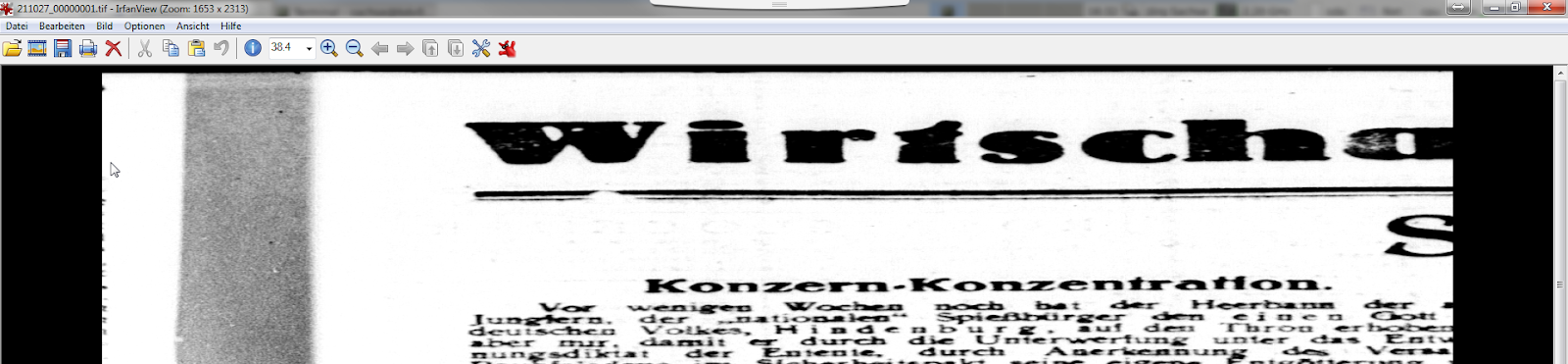
Im Gegensatz zu ihm habe ich keine Probleme damit gehabt, das TIFF überhaupt zu öffnen; der Windows-Bildbetrachter, IrfanView, MS Paint, Paint.NET und XnViewMP stellten alle das Bild dar. Allerdings war es in der Horizontalen stark gestreckt, d.h. deutlich breiter als erwartet. Große Teile des Bildinhaltes (eine gescannte Zeitschriftenseite) fehlten, und der rechte Rand war nicht sichtbar. 

kaputte Anzeige des TIFFs

In tiffinfo sahen wir, dass das TIFF ein Grayscale-Image ist:
Bits/Sample: 8
Samples/Pixel: 1

Auffällig war, dass die Listeneinträge für StripByteCounts genau um Faktor 3 größer als die ImageWidth waren (4302 * 3 = 12906); das erklärte die Streckung des Bildes in X-Richtung. Man sah außerdem, dass die StripOffsets in Schritten von 12906 Bytes anwuchsen; vermutlich war der Viewer deswegen überhaupt in der Lage, irgendein Bild anzuzeigen. Die ImageLength stimmte mit der Anzahl der Einträge in StripByteCount überein (6020), deshalb gab es hier keine Verzerrung.
Image Width: 4302
Image Length: 6020
StripByteCounts (279) LONG (4) 6020<12906 12906 12906 12906 12906 12906 12906 12906 12906 12906 12906 12906 12906 12906 12906 12906 12906 12906 12906 12906 12906 12906 12906 12906 ...> StripOffsets (273) LONG (4) 6020<8 12914 25820 38726 ...>

In Okteta konnten wir sehen, dass die Bilddaten für jedes Pixel dreimal identisch gespeichert waren. Das deckt sich der Aussage des Kollegen, dass das Bild ca. dreimal größer war als alle anderen Scans im gleichen Vorgang. Außerdem haben wir gesehen, dass das IFD0 am Dateiende stand und Hinweise auf Bearbeitungen mit IrfanView enthielt.

normales RGB-TIFF

defektes TIFF mit zwei Bytes redundanten Grayscale-Daten je Pixel


Nachdem wir das Problem verstanden hatten, haben wir Reparaturmöglichkeiten diskutiert:
- Man könnte die Redundanz der Pixel entfernen und die StripOffsets (und wahrscheinlich noch andere Offsets) anpassen. Das wäre wahrscheinlich die sauberere Lösung, müsste aber definitiv mit Softwareunterstützung getan werden.
- Man könnte die SamplesPerPixel auf "3" setzen, um die drei duplizierten Bytes je Pixel als RGB-Kanäle zu interpretieren und damit drei Bytes zu einem Pixel im Bild zusammenzufassen. Das haben wir getan, und es hat funktioniert; zumindest war das Bild anzeigbar, nicht gestaucht und nicht in ausgefallene Farben getaucht.

Zur Ursache des Fehlers gab es nun zwei Theorien:
- Es könnte einen Bitflip gegeben haben, bei dem SamplesPerPixel beschädigt wurde: der Weg von "00 11"B ("0 3" D) zu "00 01"B ("0 1" D) ist nicht weit und würde das Fehlerbild erklären.
- Es könnte einen Fehler bei der Konvertierung eines RGB-Scans von einer Grayscale-Vorlage gegeben haben, bei dem die überzähligen Bytes pro Pixel nicht entfernt wurden. Das SamplesPerPixel Tag wäre dabei korrekt und absichtlich gesetzt worden.

Als erstes haben wir nun also SamplesPerPixel im Hex-Editor auf "3" gesetzt, um den TIFF-Viewer anzuweisen, die Bilddaten als RGB-Bild zu interpretieren. Schon diese kleine Änderung bewirkte, dass sich das Bild fehlerfrei anzeigen ließ. Der Umstand, dass das Bild ungewöhnlich groß war (wir hatten erwartet, dass es ähnlich groß wäre wie die anderen Scans aus der gleichen Zeitschrift), blieb aber vorerst ungeklärt.

defektes Grayscale-TIFF, als RGB interpretiert


korrekte Anzeige des TIFFs

Wir erwägen, eine Plausibilitätsprüfung für diesen Fehlertyp in checkit_tiff zu implementieren, sofern man davon ausgeht, dass innerhalb eines Bildes alle Strips gleich lang sind. Dazu verwendet man die Formel: "StripByteCounts / SamplesPerPixel / RowsPerStrip = ImageWidth". Am einfachsten funktioniert das mit TIFFs, bei denen RowsPerStrip = 1 ist; andernfalls müssen zusätzlich komplexere Prüfungen durchgeführt werden, weil bei mehrzeiligen Strips, deren Bytelänge nicht ohne Rest ganzzahlig durch die Zeilenanzahl teilbar ist, kein Padding angefügt wird. Dadurch können Rows entstehen, die kürzer sind als die vorderen Rows eines Strips. 

Zusätzlich denkbare Plausibilitätsprüfungen wären:
- Die Höhe des Bildes ist genau so lang wie das Produkt aus RowsPerStrip und Anzahl der Strips: ImageLength = RowsPerStrip * StripOffsets.Count
- Jeder StripByteCount muss so groß sein wie die Differenz der dazugehörigen StripByteOffsets: StripByteCounts[0] = StripOffsets[1] - StripOffsets[0] (bzw. allgemeiner StripByteCounts[n] = StripOffsets[n+1] - StripOffsets[n])
- Jeder Strip muss gleich lang sein: StripByteCounts[0] = StripByteCounts[1] = StripByteCounts[2] = ... = StripByteCounts[n]

Diese Möglichkeiten haben wir im größeren Kreis diskutiert, was Andreas neugierig gemacht hat. Er hat also sein neues Tool zum Finden möglicher ehemaliger IFDs in TIFFs um einige weiche Suchkritierien erweitert und es genutzt, um IFDs aus früheren Dateiversionen zu finden. Außerdem hat er ein ganz neues Tool geschrieben, das eine TIFF-Datei und eine Adresse in Hex-Notation einliest und den Inhalt an dieser Adresse so interpretiert, als wäre dort ein IFD gespeichert. Auf diese Weise konnten wir insgesamt sechs frühere IFDs ermitteln, die auf ältere Versionen der Datei hinweisen, und den Inhalt dieser IFDs in Augenschein nehmen. Die Tools sind unter https://github.com/SLUB-digitalpreservation/fixit_tiff/tree/master/src/archeological_tools im Quellcode verfügbar; sie sind Teil des bekannten Tools fixit_tiff.

Pointer zum ursprünglichen IFD0, wie er in der ersten Version der Datei stand

Die Ausgabe möglicher IFD-Adressen sieht so aus:
# adress,weight,is_sorted,has_required_baseline
0x4a184b0,2,y,y
0x4a241aa,2,y,y
0x4a2fea4,2,y,y
0x4a3bbb0,2,y,y
0x4a478d0,2,y,y
0x4a535ea,2,y,y

Diese Adressen der IFDs haben wir mittels Hex-Editor als IFD0-Offset in die TIFF-Datei eingetragen und so in einer Art TIFF-Archäologie schrittweise die alten Versionen der Datei wieder hergestellt. Dabei bestätigte sich die Annahme, dass der Scan ursprünglich in RGB abgespeichert worden war. Danach wurde wohl eine fehlerhafte Grayscale-Konvertierung durchgeführt, bei der nur die Tags PhotometricInterpretation (min-is-black) und BitsPerSample (1) verändert wurden. Ob dabei auch die Bilddaten selbst verändert wurden, lässt sich nicht mehr genau rekonstruieren.

In der vermutlich ersten Version des IFD0 sieht man mit tiffinfo noch die Angaben zum RGB-Bild:
Photometric Interpretation: RGB color
Samples/Pixel: 3

Die späteren Fassungen dagegen enthalten die Werte:
Photometric Interpretation: min-is-black
Samples/Pixel: 1

Außerdem wurden noch einige weitere Versionen des TIFFs erzeugt, bei denen einige andere Tags verändert, hinzugefügt oder entfernt wurden (Make, Model und Software).

Der Fehler war überhaupt nur aufgefallen, weil es eine intellektuelle Prüfung gab und der Bearbeiterin der Anzeigefehler auffiel (und sie ihn dann auch gemeldet hat!). Weil außerdem die MD5-Summen erst am Ende der Bearbeitung generiert werden und damit zum Fehlerzeitpunkt noch keine Prüfsumme existierte, wäre der Fehler nicht durch einen Fixity-Mismatch aufgefallen. Die einzig saubere Lösung wird nun wohl sein, die Seite neu zu scannen. Trotzdem ist es aber sehr eindrucksvoll zu sehen, welche Möglichkeiten das TIF Format bietet, kaputte Dateien wiederherzustellen.

frühere Artikel zu diesem Thema (also available in English):


-------------------------------------------------------------------------------------------------------------------

english version

A few days ago, a colleague gave us an interesting TIFF. It had successfully completed all validation attempts and didn't show any signs of structural issues in tiffinfo/tiffdump. However, it was not possible to display the image in the preview of the workflow tool used. Also, it was about three times the size of the other scans in the same intellectual entity. Our colleague asked us to have a closer look at that TIFF, so we went at it.

In contrast to our colleague, I didn't have any problem in displaying the TIFF altogether; the  Windows Image Viewer, IrfanView, MS Paint, Paint.NET und XnViewMP all displayed the image correctly. However, it was significantly stretched horizontally, which means that it was a lot wider than expected. Large parts of the scanned newspaper page were missing, and the rightmost part of the image was not visible.

broken display of the TIFF

In tiffinfo, we saw that the TIFF is a grayscale image:
Bits/Sample: 8
Samples/Pixel: 1

Particularly striking was the fact that the list entries for StripByteCounts was exactly by faktor 3 larger than the ImageWidth (4302 * 3 = 12906), which explained the stretch we saw in the image. Also, you could see that the StripOffsets grew in steps of 12906 Bytes; presumeably that's why the viewer was able to display a picture in the first place, regardless of the final quality. The ImageLength matched up with the number of entries in StripByteCount (6020), which is why there was no stretch in vertical direction.
Image Width: 4302
Image Length: 6020
StripByteCounts (279) LONG (4) 6020<12906 12906 12906 12906 12906 12906 12906 12906 12906 12906 12906 12906 12906 12906 12906 12906 12906 12906 12906 12906 12906 12906 12906 12906 ...> StripOffsets (273) LONG (4) 6020<8 12914 25820 38726 ...>

We could see in Okteta that the image data for each pixel were saved identically three times in a row. That explains our colleagues information about the filesize being three times larger than the other files in that IE. Also, we noticed that the IFD0 was written to the end of the file and contained information about an editing step in IrfanView.

normal RGB-TIFF

defective TIFF with two Bytes of redundant grayscale data per pixel

After having understood the problem, we discussed possible ways to repair the file:
- We could remove the redundant pixels and adapt the StripOffsets (and quite possibly all other ofsets in that file). While this is the more proper solution, software support for this kind of work would be imperative.
- We could set SamplesPerPixel to"3" to interpret the three duplicate pixels each as three RGB channels, thus summarizing three Bytes into one pixel. We actually did that, and it worked like a charm; at least we could display the image without getting any stretching or funky colors.

Now we had two theories about the origin of this error:
- There might have been a bit flip that damaged SamplesPerPixel. It's not a long way to go from "00 11"B ("0 3" D) to "00 01"B ("0 1" D), and it would explain the error we're seing.
- There could have been an error during a conversion of an RGB scan that was made from an analog grayscale template, during which the unnecessary pixels have not been removed. During this conversion, the SamplesPerPixel tag would have been rightfully set to a new value.

In a first test we set SamplesPerPixel to "3" using a Hex editor in order to command the TIFF viewer to interpret the image data in an RGB fashion. This little change alone caused the image to be displayed without any errors. The puzzle, however, that the image was uncommonly large (we expected it to about ad big as the other scans from the same newspaper) remained unsolved.


defective grayscale TIFF, interpreted as RGB

TIFF displayed correctly

We contemplated implementing plausibility checks for this type of error in checkit_tiff, which would be easily feasible assuming that all Strips in an image are of the same length. The following formula could be used: "StripByteCounts / SamplesPerPixel / RowsPerStrip = ImageWidth". This works best for TIFFs with RowsPerStrip = 1 set; other TIFFs would have to undergo more complex checks, because multiline Strips with byte counts that cannot be divided by the row number without modulo may not contain any padding. Due to this, there may be Rows that are shorter that the previous Rows in the same Strip. 

Other possible plausibility checks include:
- The image height is exactly as large as the multiplication product of RowsPerStrip and number of Strips: ImageLength = RowsPerStrip * StripOffsets.Count
- Each StripByteCount must be equally large as the difference of the neighboring StripByteOffsets: StripByteCounts[0] = StripOffsets[1] - StripOffsets[0] (or more general StripByteCounts[n] = StripOffsets[n+1] - StripOffsets[n])
- Each Strip needs to be equally long: StripByteCounts[0] = StripByteCounts[1] = StripByteCounts[2] = ... = StripByteCounts[n]

We discussed these possibilities in a larger group, which made Andreas curious, so he sat down to enhance his tool for finding candidates for former IFDs in TIFFs by some soft search criteria. Furthermore, he created an entirely new tool reads a TIFF and interprets the contents at a given address in a way that ressembles the IFD structure. This way, we were able to identify six former IFDs that hint to older versions of this file and inspect these IFDs a little further. The tools are available at https://github.com/SLUB-digitalpreservation/fixit_tiff/tree/master/src/archeological_tools in source code, they are part of the established tool fixit_tiff.

Pointer to the original IFD0, just like it was stored in the 1st file version

The list of possible IFD addresses as given by our tools looks like this:
# adress,weight,is_sorted,has_required_baseline
0x4a184b0,2,y,y
0x4a241aa,2,y,y
0x4a2fea4,2,y,y
0x4a3bbb0,2,y,y
0x4a478d0,2,y,y
0x4a535ea,2,y,y

We inserted these IFD addresses into the file's IFD0 offset pointer using a Hex Editor. Step by step, using this method, we were able to recreate older versions of the file in an archaeology style of work. In the course of the work we could confirm that the scan was originally saved in RGB. Later, there must have been an error in a grayscale conversion where only the tags PhotometricInterpretation (min-is-black) and BitsPerSample (1) were changed. We were not able to find out if the image data had been altered as well.

Ttiffinfo shows these information from the preusmeable 1st IFD0 version of the RGB image:
Photometric Interpretation: RGB color
Samples/Pixel: 3

Later versions, however, contain the values:
Photometric Interpretation: min-is-black
Samples/Pixel: 1

Also, there have been later files versions where some other tags have been added, altered or deleted (Make, Model and Software).

The error was only even discovered because intellectual checks were in place and the human operator noticed the error in displaying the TIFF (and because she decided to inform our colleague of this oddity!). Also, because checksums are only generated after the processing workflow is completed, we wouldn't have noticed the error by a fixity mismatch. We simply didn't have any checksums yet to compare the image against. In the end, the only proper solution will be a rescan of that newspaper page. However, it's still impressive to see the possibilities that TIF offers to repair seemingly broken images.

former articles on this subject (also available in English):

Dienstag, 16. Mai 2017

Über die Idee, ein Langzeitarchiv vermessen zu wollen

OpenClipart von yves_guillou, sh. Link
OpenClipart von yves_guillou, sh. Link im Bild
Irgendwann gerät man in einer Organisation an den Punkt, an dem man auf Menschen trifft, die sich den Zahlen verschrieben haben. Menschen, die als Mathematiker, als Finanzbuchhalter oder als Controller arbeiten. Das ist okay, denn Rechnungen wollen bezahlt, Ressourcen geplant und Mittel bereitgestellt werden.

Omnimetrie


Problematisch wird das Zusammentreffen mit Zahlenmenschen dann, wenn diese die Steuerung der Organisation bestimmen. Wenn es nur noch um Kennzahlen geht, um Durchsatz, um messbare Leistung, um Omnimetrie.

Schon Gunter Dueck schrieb in Wild Duck¹: "In unserer Wissens- und Servicegesellschaft gibt es immer mehr Tätigkeiten, die man bisher nicht nach Metern, Kilogramm oder Megabytes messen kann, weil sie quasi einen 'höheren', im weitesten Sinn einen künstlerischen Touch haben. Die Arbeitswelt versagt bisher bei der Normierung höherer Prinzipien."
  

Zahlen lügen nicht


Schauen wir uns konkret ein digitales Langzeitarchiv an. Mit Forderungen nach der Erhebung von Kennzahlen, wie:
  • Anzahl der Dateien, die pro Monat in das Archiv wandern, 
  • oder Zahl der Submission Information Packages (SIPs), die aus bestimmten Workflows stammen, 
demotiviert man ein engagiertes Archivteam. 

Denn diese Zahlen sagen nichts aus. Digitale Langzeitarchive stehen auch bei automatisierten Workflows am Ende der Verwertungskette. Es wäre in etwa so als würde man den Verkauf von Würstchen an der Zahl der Besucher der Kundentoilette messen wollen.

In der Praxis ist es so, dass Intellektuelle Einheiten (IE), die langzeitarchiviert werden sollen, nach dem Grad ihrer Archivfähigkeit und Übereinstimmung mit den archiveigenen Format-Policies sortiert werden.

Diejenigen  IEs, die als valide angesehen werden, wandern in
Archivinformationspaketen (AIP) eingepackt in den Langzeitspeicher. Die IEs, die nicht archivfähig sind, landen in der Quarantäne und ein Technical Analyst (TA) kümmert sich um eine Lösung oder weist die Transferpakete (SIP) mit diesen IEs zurück.

Wenn wir einen weitgehend homogenen Workflow, wie die Langzeitarchivierung von Retrodigitalisaten, betrachten, so sollte der größte Bestandteil der IEs ohne Probleme im Langzeitspeicher landen können. In dem Fall kann man leicht auf die Idee kommen, einfach die Anzahl der IEs und Anzahl und Größe der zugehörigen Dateien zu messen, um eine Aussage über den Durchsatz des Langzeitarchivs und die Leistung des LZA-Teams zu bekommen.

Ausnahme Standardfall


Doch diese Betrachtung negiert, dass nicht der Standardfall, wo IEs homogenisiert und automatisiert in das Archivsystem wandern, zeitaufwändig ist, sondern der Einzelfall, in dem sich der TA mit der Frage auseinander setzen muss, warum das IE anders aufgebaut ist und wie man eine dazu passende Lösung findet.

Formatwissen


Was die einfache Durchsatzbetrachtung ebenfalls negiert, ist, dass das Archivteam Formatwissen für bisher nicht oder nur allgemein bekannte Daten- und Metadatenformate aufbauen muss. Dieser Lernprozess ist hochgradig davon abhängig, wie gut die Formate bereits dokumentiert und wie komplex deren inneren Strukturen sind.

Organisatorischer Prozess


Ein dritter Punkt, den ein Management nach der Methode Omnimetrie negiert, ist die bereits im Nestor-Handbuch² formulierte Erkenntnis, dass digitale Langzeitarchivierung ein organisatorischer Prozess sein muss.

Wenn, wie in vielen Gedächtnisorganisationen, die Retrodigitalisate produzieren, auf Halde digitalisiert wurde, und das Langzeitarchivteam erst ein bis zwei Jahre später die entstandenen digitalen Bilder erhält, so kann von diesem im Fehlerfall kaum noch auf den Produzenten der Digitalisate zurückgewirkt werden. Die oft projektweise Abarbeitung von Digitalisierungsaufgaben durch externe Dienstleister verschärft das Problem zusätzlich. Was man in dem Falle messen würde, wäre in Wahrheit keine Minderleistung des LZA-Teams, sondern ein Ausdruck des organisatorischen Versagens, die digitale Langzeitverfügbarkeit der Digitalisate von Anfang an mitzudenken.

Natürlich ist es sinnvoll, die Entwicklung des Archivs auch mit Kennzahlen zu begleiten. Speicher muss rechtzeitig beschafft, Bandbreite bereitgestellt werden. Auch hier gilt, Augenmaß und Vernunft.

¹ Gunter Dueck, Wild Duck -- Empirische Philosophie der Mensch-Computer-Vernetzung, Springer-Verlag Berlin-Heidelberg,  (c)2008, 4. Auflage., S. 71
² Nestor Handbuch -- Eine kleine Enzyklopädie der digitalen Langzeitarchivierung, Dr. Heike Neuroth u.a., Kapitel 8 Vertrauenswürdigkeit von digitalen Langzeitarchiven, von Susanne Dobratz und Astrid Schoger, http://nestor.sub.uni-goettingen.de/handbuch/artikel/text_84.pdf, S.3

Dienstag, 22. November 2016

Some thoughts about risks in TIFF file format

Introduction

TIFF in general is a very simple fileformat. It starts with a constant header entry, which indicates that the file is a TIFF and how it is encoded (byteorder).
The header contains an offset entry which points to the first image file directory (IFD). Each IFD has a field which counts the number of associated tags, followed by an array of these tags and an offset entry to the next IFD or to zero, which means there is no further IFD.
Each tag in the array is 12 Bytes long. The first 4 bytes indicate the tag itself, the next 2 bytes declare the value-type, followed by 2 bytes counting the values. The last 4 bytes are either an offset or hold the values themselves.

What makes a TIFF robust?

In the TIFF specification, there are some hints which help us to repair broken TIFFs.
The first hint is that all offset-addresses must be even. The second important rule is that the tags in an IFD must be sorted in an ascending order.
At last, the TIFF spec defines different areas in the tag range. This is to guarantee that the important values are well defined.
If we guarantee that a valid TIFF was stored, there is a good chance to detect and repair broken TIFFs using these three hints.

What are the caveats of TIFF?

As a proof of concept there is also a tool "checkit_tiff_risks" provided in this repository. Using this tool, users can analyze the layout of any baseline TIF file.
The most risky memory ranges are the offsets. If a bitflip occurs there, the user must search the complete 4GB range. In practise, the TIF files are smaller, and so this size is the searchspace for offsets.
The most risky offsets are the ones which are indirect offsets. This means the IFD0 offset and the StripOffset tag (code 273).
Here an example of a possible complex StripOffset encoding:
The problem in this example is that TIFF has no way to find out how many bytes are part of the pixel-data stream. The existing StripByteCounts tag only stores the expected pixel data length after decompression.
This makes the StripOffset tag very fragile. If a bitflip changes the offset of the StripOffset tag, the whole pixel information might be lost.
Also, if a bitflip occurs in the offset area that the StripOffset tag points to, the partial pixel data of the affected stripe is lost.
If compression is used, the risk of losing the whole picture is even higher, because the compression methods do not use an end-symbol. Instead, the buffer sizes as stored in the StripByteCount tag are used. Therefore, a bit-error in the Compression tag, the StripOffset tag, the StripByteCount tag or in the memory-map where StripOffset points to, could destroy the picture information.

Upcoming next…


In upcoming versions of checkit_tiff, we would provide a tool to analyze the distribution of risky offsets in given TIFF-files.  This will objectify the discussion about robust fileformats vs. compression.

Here a short preview:

$>  ./checkit_tiff_risk ../tiffs_should_pass/minimal_valid.tiff

This reports this kind of statistics:

[00], type=                  unused/unknown, bytes=         0, ratio=0.00000
[01], type=                        constant, bytes=         4, ratio=0.01238
[02], type=                             ifd, bytes=       130, ratio=0.40248
[03], type=                  offset_to_ifd0, bytes=         4, ratio=0.01238
[04], type=                   offset_to_ifd, bytes=         4, ratio=0.01238
[05], type= ifd_embedded_standardized_value, bytes=        52, ratio=0.16099
[06], type=   ifd_embedded_registered_value, bytes=         0, ratio=0.00000
[07], type=      ifd_embedded_private_value, bytes=         0, ratio=0.00000
[08], type=ifd_offset_to_standardized_value, bytes=        12, ratio=0.03715
[09], type=  ifd_offset_to_registered_value, bytes=         0, ratio=0.00000
[10], type=     ifd_offset_to_private_value, bytes=         0, ratio=0.00000
[11], type=      ifd_offset_to_stripoffsets, bytes=         0, ratio=0.00000
[12], type=               stripoffset_value, bytes=        30, ratio=0.09288
[13], type=              standardized_value, bytes=        87, ratio=0.26935
[14], type=                registered_value, bytes=         0, ratio=0.00000
[15], type=                   private_value, bytes=         0, ratio=0.00000
counted: 323 bytes, size: 323 bytes


In this example the StripOffset is encoded directly (there are only one stripe). The problematic bytes are the offset-addresses (affected 20 Bytes of 323 Bytes).

In opposite to this example, here a special file using multiple strips:

$>  ./checkit_tiff_risk ../tiffs_should_pass/minimal_valid_multiple_stripoffsets.tiff

This reports this kind of statistics:

[00], type=                  unused/unknown, bytes=         0, ratio=0.00000
[01], type=                        constant, bytes=         4, ratio=0.01250
[02], type=                             ifd, bytes=       122, ratio=0.38125
[03], type=                  offset_to_ifd0, bytes=         4, ratio=0.01250
[04], type=                   offset_to_ifd, bytes=         4, ratio=0.01250
[05], type= ifd_embedded_standardized_value, bytes=        44, ratio=0.13750
[06], type=   ifd_embedded_registered_value, bytes=         0, ratio=0.00000
[07], type=      ifd_embedded_private_value, bytes=         0, ratio=0.00000
[08], type=ifd_offset_to_standardized_value, bytes=        16, ratio=0.05000
[09], type=  ifd_offset_to_registered_value, bytes=         0, ratio=0.00000
[10], type=     ifd_offset_to_private_value, bytes=         0, ratio=0.00000
[11], type=      ifd_offset_to_stripoffsets, bytes=        40, ratio=0.12500
[12], type=               stripoffset_value, bytes=        30, ratio=0.09375
[13], type=              standardized_value, bytes=        56, ratio=0.17500
[14], type=                registered_value, bytes=         0, ratio=0.00000
[15], type=                   private_value, bytes=         0, ratio=0.00000
counted: 320 bytes, size: 320 bytes


Here you can see we have the type 11, which points StripOffset to an array of offset adresses, where the pixel data could be found. This is similar to the diagram above. In this case we have 40 bytes with high bitflipping risk.


Dienstag, 7. Juni 2016

Validating TIFFs with embedded color profiles

About ICC profile validation


In the last days we enhanced our baseline TIFF conformance checking tool "checkit_tiff" with support to validate TIFFs containing embedded ICC profiles.

There are two specifications of ICC profiles. The first and older one is from the year 2001 and available at http://www.color.org/ICC_Minor_Revision_for_Web.pdf. The second one (and current version) is  http://www.color.org/specification/ICC1v43_2010-12.pdf.

The ICC profile standards are very complex and do not really fit in the design of the checkit_tiff configuration files, so we decided to check only the headers of the embedded ICC profiles for now.

Because the differences between the headers of both standards are very marginal at first sight, this could be simple enough to additionally implement it in checkit_tiff.

For more detailed checks we would need a plugin system to delegate validation of embedded standards (as ICC, XMP and so on) to more highly specialized validators.

Ooops, our tool finds more broken TIFFs again


To test the validation, we ran checkit_tiff against some old tiffs from our digitization collection. As you can see in the following picture, the checkit_tiff tool detects a discrepancy between the size of the embedded ICC-profile as reported in TIFF-tag (34675) and the size reported by the ICC profile itself:


After some analysis we made an interesting observation. The given TIFF reports a size of 13691 bytes (in hex: 0x357b), but the ICC itself (tag "profile size") reports a size of 669051 bytes (in hex: 0xa357b). We thought we had a bug in our TIFF tag or ICC header decoding, but other tools (exiftool or tiffdump) also reported this difference.

As we saw in previous TIFFs, some TIFF implementations are wrong and often some information were missing because of off-by-one errors. In this case, it seems that the software "Omniscan 12.8 Build2476" does not correctly fill the Tiff-tag 34675 for ICC-profile, leaving out the most significant byte (here: '0xa').

We need your help


Anyway. Writing a conformance checker is a tough job and sometimes we introduce bugs in this kind of software as well. Therefore, please have a look at the code of checkit_tiff, test it and send us bug reports if you find any bugs.
The code can be found on https://github.com/SLUB-digitalpreservation/checkit_tiff.

Here are some open questions about ICC profiles that we have encountered:


  • We found some TIFFs which reported ICC version 4.2.0, but on http://www.color.org we only found versions 4.3.0 and 2.4.0. Could you help us to find out the differences in the headers for the different versions?


  • The meaning of the field "preferred CMM type" is unclear. We assume that the list of allowed strings is part of the document http://www.color.org/registry/signature/TagRegistry-2016-05.pdf. But we have also found a TIFF where the string 'Lino' is set for this ICC header field. Are we interpreting the document in a wrong way, or has the tag been set to an incorrect value?


Montag, 1. September 2014

Dateiformat-Explosion

Vorwort


Zum Bibliothekartag 2014 gab es im Nachtrag zu unserem Vortragsblock eine rege Diskussion darüber, ob es sinnvoll ist, erst einmal alle Dateien in ein Langzeitarchiv aufzunehmen und sich später Gedanken darüber zu machen, wie man deren Langzeitverfügbarkeit z. B. durch Formatmigration sicherstellt.

Ich habe viel recherchiert, aber wenig belastbare Zahlen gefunden. Ein guter Indikator könnten die Signaturen für DROID sein, einem Programm zur Ermittlung des Datenformates unbekannter Dateien.

Auf Pronom findet man 77 Versionen von 08-2005 bis 07-2014, von ehedem 766 bis heute 1.459 von DROID unterstützten Signaturen.

Alternativ könnte man die Datenbanken des Unix-Befehls file (http://www.darwinsys.com/file/) heranziehen. Auf ftp://ftp.astron.com/pub/file/ findet man Versionen von 08-2008 bis 06-2014.

Eine andere Möglichkeit wäre, die bei der IANA registrierten MIME-Types (zur Zeit 1.087 verschiedene Signaturen) heranzuziehen: http://www.iana.org/assignments/media-types/media-types.xhtml

Außerdem wurde ich noch auf http://fileformats.archiveteam.org/wiki/Main_Page aufmerksam gemacht.

Leider gibt es zu den letzten beiden Links keine auswertbare Timeline.

Was uns 'file' verrät


Wir können annehmen, dass sowohl bei 'file' als auch bei DROID, die Signaturen in gewisser Weise die Dateiformate enthalten, die auch weit verbreitet sind. Wie stark wissen wir nicht, aber wenn sie total unbedeutend wären, hätte sich keiner die Mühe gemacht, für diese Signaturen zu erstellen.

Wir können ferner annehmen, dass nach einer gewissen Einschwingzeit die Zahl der Dateiformate in diesen Signatur-Datenbanken der Anzahl der tatsächlich verbreiteten Dateiformate entspricht.

Im Folgenden das Diagramm der Entwicklung der Dateiformate basierend auf der file Magic Bytes Datenbank von Ende 1999 bis Mitte 2014.

Count of different fileformats based on magic bytes database of file, 08/2014, Andreas Romeyke

Als Grundlage für das Diagramm diente das GIT-Repository von file, genauer das Verzeichnis 'magic/Magdir'. Über die Tags extrahierte ich alle Versionen des Verzeichnisses und ließ das folgende Script die dem Diagramm zugrunde liegende CSV-Datei erstellen:


#!/bin/bash
echo "#version, date, group, count"
for version in *;do
  for sub in $version/magic/Magdir/* ; do
    group=$(basename $sub); 
    count=$(cat $sub | grep "^0" | wc -l);
    date=$(cd $version; git log --name-status --date=raw \
    --pretty='format:commit,%ae,%ai,%ce'| cut -d "," -f 3| head -n 1|\
    cut -d " " -f 1)
    echo "$version, $date, $group, $count"; 
  done ;
done


Sehr überraschend für uns war der nahezu lineare Verlauf der Formatvielfalt. Um auszuschließen, dass dies andere Ursachen hat, war es notwendig, eine zweite, von file unabhängige Quelle heranzuziehen.

DROID/Pronom als Quelle


Die Entwickler von DROID haben, wie oben bereits angedeutet, ihre Signaturfiles von Version 1 bis zur aktuellen Version 77 online angeboten.

Pronom hat als Projekt das Ziel, für Langzeitarchive eine verlässliche Quelle für Dateiformate, Signaturen und zugeordnete Programme bereitzustellen. DROID übernimmt als Programm die Aufgabe der Identifikation unbekannter Formate.

Durch den strukturierten Aufbau der Signaturdateien ist eine automatische Auswertung möglich.

Im Folgenden ist die Anzahl der verschiedenen Dateiformate über die Zeit zu sehen:


Count of different fileformats based on DROID signatures, 08/2014, Andreas Romeyke
Auch hier ergibt sich ein nahezu linearer Zuwachs, spätestens ab Mitte 2010.

Da erst in späteren Signaturen ab ca. 2009 auch MIME-Types hinterlegt wurden, sieht die Entwicklung der einzelnen Kategorien im folgenden Diagramm etwas anders aus:

Count of different fileformats per category, based on DROID signatures, 08/2014, Andreas Romeyke

Hier noch das Shell-Script:

#!/bin/bash
echo "#version, date, application, text, images, audio, video"
for i in droid/DROID_SignatureFile_V*.xml; do
  version=$(echo $i |sed -e "s/.*_V\([^.]\+\).*/\1/" );
  date=$(cat $i | grep -m 1 "DateCreated=" |\
  sed -e "s/.*DateCreated=\"\(....-..-..\).*/\1/" );
  echo -n "$version, $date,"
  for category in application text image audio video; do
    count=$(xmlstarlet sel -t -v\
    "//_:FileFormat[contains(@MIMEType, \"$category/\")]/@Name" $i| \
    sort | uniq | wc -l)
    echo -n "$count,"
  done;
  echo
done | sort -n 

Wenn pro Jahr also 90 neue Dateiformate…


Die Anzahl der  Dateiformate wächst nahezu linear. Pro Jahr kommen im Schnitt 90 neue Dateiformate hinzu, die immerhin eine solche Verbreitung erfahren, dass sie in den Signatur-Datenbanken Widerhall finden.

Wenn wir in Zeiträumen von 50 Jahren denken, haben wir knapp 5000 Formate zu behandeln.

Wer alles in sein Langzeitarchiv hineinkippt, was ihm seine Nutzer anbieten, wird daher in Zukunft kaum die Ressourcen haben, Spreu und Weizen zu trennen und eine Langzeitverfügbarkeit sicherzustellen.

Die Entwicklung zeigt, dass dringend eine Spezialisierung der Langzeitarchive notwendig ist, um Wissen über Formate aufzubauen und sich gegenseitig zu unterstützen.

Es zeigt auch weiterhin, dass Nutzer der Archive über die Problematik aufgeklärt werden müssen.